Thank you!
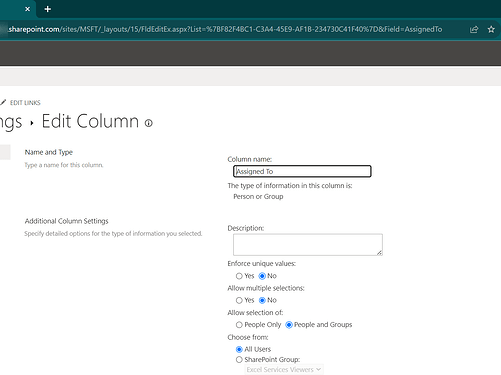
But I need the screenshot of the column settings page with the page URL as in this example:
Thank you!
But I need the screenshot of the column settings page with the page URL as in this example:
Let me know if this is the one you wanted.. thank you again for your assistance.
20230831Column.pdf (235.5 KB)
Hello @rhonda,
Yes, thank you!
Please also share the same screenshot of the columns you want to get form the Hotels list:
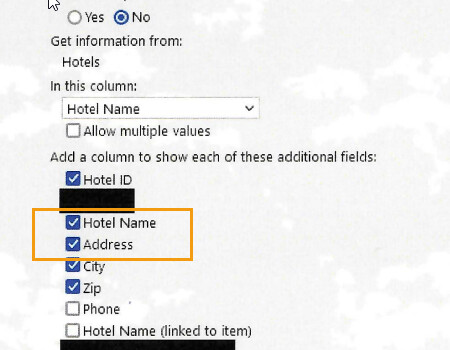
Hi... attached is the screenshot for the columns of "Hotels" list
20230905HotelNameandAddress.pdf (539.0 KB)
.
Thanks, Rhonda
Dear @rhonda,
Everything looks correct. I like your code here:
fd.field('Hotels').$on('change', function(value){
//populate Address field with the Extra field value
fd.field('Address').value = fd.field('Hotels').value. Address;
});
You do however have an extra space before Address, try without it:
fd.field('Hotels').$on('change', function(value){
//populate Address field with the Extra field value
fd.field('Address').value = fd.field('Hotels').value.Address;
});
You can also add console.log or alert to test what value is retrieved:
fd.field('Hotels').$on('change', function(value){
//populate Address field with the Extra field value
console.log(fd.field('Hotels').value);
console.log(fd.field('Hotels').value.Address);
fd.field('Address').value = fd.field('Hotels').value.Address;
});
After getting the change event to run, if you're still not getting results, please, check browser's console for values or errors and send us a screenshot.
Thank you. All seems to be working now.
Hi.... I am now trying to filter the "HotelName' column (the third of my cascading lookups) by one of the "Extra Fields" from the Hotel lookup. I have the field names in the Extra Columns. I have tried all of the code options below in both spRendered and spBeforeRender after getting errors.
When I use the code below, I get an error indicating that the field is undefined:
fd.spRendered(function() {
fd.field('Hotels').filter = "HotelStatus ne 'Inactive'";
fd.field('Hotels').widget.dataSource.read();
});
When I use the code below here, I get another error(fd.field widget is null) :
fd.spRendered(function() {
fd.field('HotelName').filter = "HotelStatus ne 'Inactive'";
fd.field('HotelName').widget.dataSource.read();
});
I have also tried fd.field('Hotels').refresh() and fd.field('HotelName').refresh() instead of widget.DataSource.read(). This does not cause an error with HotelName, but the filter is not applied. With Hotels, I get an error fd.field is undefined.
I have also tried console.log(fd.field('Hotels').value.HotelStatus) and console.log(fd.field('HotelName').value.HotelStatus
The original Status field was a Choice data type, so I created a calculated field named HotelStatus where the value is =[Status] since I didn't think Choice data type would work.
I think you have all of the column info for Hotels and HotelName from my previous questions.
I have reviewed and tried multiple ways of filtering that I found in the documentation and blogs. Nothing is working for me.
Any assistance you can provide is appreciated.
Dear @rhonda,
Use the Name of the field, and try the ready() event as well - Lookup field — SharePoint forms
fd.spRendered(function() {
  fd.field('Hotels').ready(function(field) {
    field.filter = "HotelStatus ne 'Inactive'";
  });
});
Hi.... I am still getting the fd.field(....) is undefined with your suggestion of using field.
Please note that "Hotels" is not a field on this form, but is a lookup for the field "HotelName" and the "Status" field is part of the "Hotels" list.
Thanks, Rhonda
Dear @rhonda,
What's the name of the field on the form? Please, copy all this information for me:
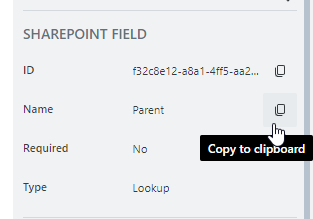
Hi ... please check pages 2 and 3 of this attachment for the info requested.
20230830ExtraFields.pdf (1.1 MB)
Dear @rhonda,
This information is not very helpful, as it has no field name - can you send me a similar screensnot from the editor? It might look a little different if you're using an older version of the editor:
Hi.. attached are the requested screenshots. I appreciate any help.
Thank you, Rhonda
20230911SPFields.pdf (928.8 KB)
Hello @rhonda,
The Calculated column type cannot be used in the OData query. Please filter by Choice or Text column.
From the file you've shared you have 3 fields:
Please use these internal names in the code.
The example of the code to filter lookup dynamically:
fd.spRendered(function() {
    //lookup field
    fd.field('FieldName').ready(function() {
        fd.field('FieldName').filter = "Title ne 'Inactive'"
        fd.field('FieldName').refresh();
    });

    //lookup control
    fd.control('ControlName').ready(function() {
        fd.control('ControlName').filter = "Title ne 'Inactive'"
        fd.control('ControlName').refresh();
    });
});Thanks for your reply. I have tried the approve code, and it is not filtering. I am thinking I do not have the correct field name. Here is the situation:
HotelState - (first drop-down)
HotelCity - (second drop-down - only displays the cities in the state chosen in the previous drop-down)
HotelName - (third drop-down - only displays the hotels in the City chosen in the previous drop-down)
In HotelName there is a field called Hotels which is a lookup field to another list (Hotels). In the Hotels list, there is a field named "Status". The "Status" field in the list Hotels is the one I need to filter on - removing 'Inactive' hotels. In this lookup field "Hotels" I have selected several fields to be displayed: Title, ID, Address. However, "Status" is not available as to select as a column. I assumed that it was because Status was a Choice field. I don't know if that matters based on your direction above.
fd.spRendered(function() {
fd.field('HotelName').ready(function() {
fd.field('HotelName') = "Status ne 'Inactive'";
fd.field('HotelName') = refresh();
});
The above code gives me no errors, but does not remove the Hotels that have a "Statues" equal to 'Inactive'. Is this because I am selecting the other drop-down fields after the page renders?
});
I have put this on-hold for now, but appreciate any further insight you may have.
Hello @rhonda,
From your message I understand the HotelName is a lookup field to the list with the hotel names, let's name it List A. List A has a Lookup column to the Hotels list and you want to filter the HotelName by Status column from the Hotels list. Is that correct?
If so, you can't apply filter like that. You can filter only by columns that exist in the source list. I think the best way for you would be to restructure the data, so you have all the information (State, City, Hotel Name, Status, etc) in one list.
Thank you .... this is the exact scenario and explains why it is not working.