Hello,
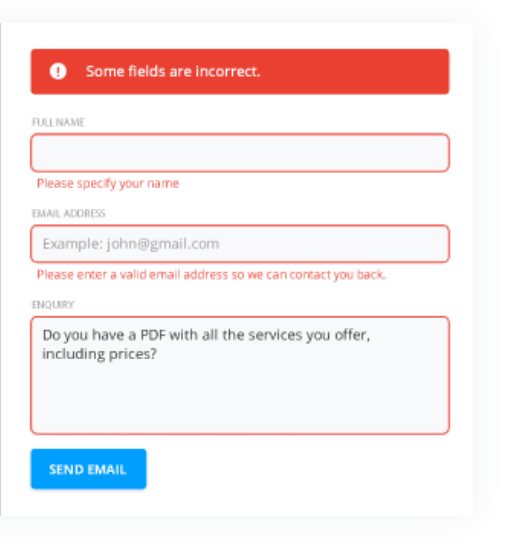
I would like to add friendlier messages to fields that have not been filled in by the user. Is this possible?
Please see the image below:
Thank you in advance!
Hello,
I would like to add friendlier messages to fields that have not been filled in by the user. Is this possible?
Please see the image below:
Thank you in advance!
Hello @Qman,
You can change the error message for all required fields using this code:
fd.created(function(vue) {
    fd.messages.RequiredValidator_Error = "Please enter value";
});
Or add a custom validator with the specific error message like this:
fd.spRendered(function() {
fd.field('Title').validators.push({
    name: 'MyCustomValidator',
    error: 'Please enter the title',
    validate: function(value) {
        if (!value) {

            return false;
        }
        return true;
    }
});
});Thank you @Margo !!
Hi mnikitina,
I have put all this code inside the fd.created(function(vue){ and changed the error messages but nothing has changed.
fd.created(function(vue) {
fd._vue.lang.Failure_General = "An error has occured. Please check the browser console (F12).";
fd._vue.lang.Failure_ItemNotFound = "An item was not found. It may have been deleted or renamed by another user.";
fd._vue.lang.PlumsailForm_CorrectErrors = "Please correct the errors below:";
fd._vue.lang.PlumsailForm_Submission_Error = "An error has occured while saving the form. Please check the console (F12).";
fd._vue.lang.PlumsailForm_Submission_Success = "The form has been submitted successfully.";
fd._vue.lang.RequiredValidator_Error = "Please select an answer";
fd._vue.lang.SPDataTable_AddNewItem = "Add new item";
fd._vue.lang.SPDataTable_ListNotFoundError = "List does not exist.";
fd._vue.lang.SPDataTable_Upload = "Upload";
fd._vue.lang.SPDataTable_Uploading = "Uploading...";
fd._vue.lang.SPFormToolbar_Close = "Close";
fd._vue.lang.SPFormToolbar_Edit = "Edit";
fd._vue.lang.SPFormToolbar_Save = "Save";
fd._vue.lang.SPFormToolbar_Saving = "Saving...";

});
Does this need to be placed inside a fd.spRendered(function(){ in order to change the error messages?
Like so:
fd.spRendered(function(){
fd.created(function(vue) {
fd._vue.lang.Failure_General = "An error has occured. Please check the browser console (F12).";
fd._vue.lang.Failure_ItemNotFound = "An item was not found. It may have been deleted or renamed by another user.";
fd._vue.lang.PlumsailForm_CorrectErrors = "Please correct the errors below:";
fd._vue.lang.PlumsailForm_Submission_Error = "An error has occured while saving the form. Please check the console (F12).";
fd._vue.lang.PlumsailForm_Submission_Success = "The form has been submitted successfully.";
fd._vue.lang.RequiredValidator_Error = "Please select an answer";
fd._vue.lang.SPDataTable_AddNewItem = "Add new item";
fd._vue.lang.SPDataTable_ListNotFoundError = "List does not exist.";
fd._vue.lang.SPDataTable_Upload = "Upload";
fd._vue.lang.SPDataTable_Uploading = "Uploading...";
fd._vue.lang.SPFormToolbar_Close = "Close";
fd._vue.lang.SPFormToolbar_Edit = "Edit";
fd._vue.lang.SPFormToolbar_Save = "Save";
fd._vue.lang.SPFormToolbar_Saving = "Saving...";
});
});
I'm working on SharePoint 2019 'on Premises'
Thanks for your help as always!
Hello @DryChips,
All messages are stored in fd.messages property. To change the text for the message use this code:
fd.created(function(vue) {
    fd.messages.SPFormToolbar_Saving = "Saving..";
});
If the code doesn't work, check browser's console for errors.