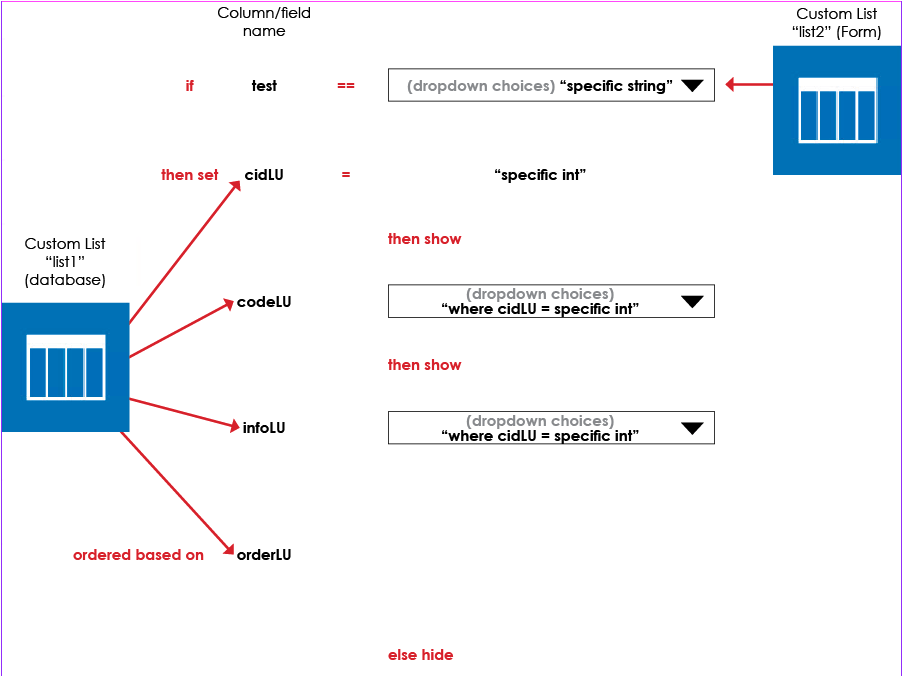
I have been able to show or hide certain SPO fields based on conditions. Such as if "field1" == "something1", then "show/hide field2". I was able to learn that from the documentation. Thank you for posting that on your site.
Now I need to take a deeper dive. From top left to bottom illustrates the order of operations - or desired results.
This is more complex than your documentation and I am at a roadblock. Thank you for any help you can offer.
Plumsail Forms SharePoint Online Version 1.4.6 (2019)
To answer your questions:
Field types - DropDown (SharePoint Choice)
Condition - Dynamic (based on other fields value)
Lookup field - ordered, yes
Information basis - main group, sub-groups, etc.
In the screenshot, you can see each of the areas of the outline. This entire outline will be available based on the selection of a choice field immediately listed before the outline. Once that required selection is made, I need JavaScript to reveal the related outline (I have all outlines in a master list used as a database). I successfully have been able to show/hide fields based on the choice. What I cannot do is to figure out how to do is...I will give you a scenario:
User chooses B (from screenshot), A + C-F should all be hidden. Further, if the user has chosen B from a DropDown, (B) itself and (2.) cannot be chosen because they have children, so valid choices for B would be (B.1.), (B.2.a), (B.2.b), (B.2.c), or (B.2.d).
I have temporarily used a workaround, employing SharePoint managed data fields to hide certain choices that are not related. It was the least desired option, but I needed to keep the project moving.
You can set up filtering of the lookup field values based on the input from the different field.
It will be very similar to cascading lookup but based on a drop-down field value. You can find an example in the 'Cascading Lookups (Filtering)' article.