Choice field : how to use local variables in widgetOptions template?

Hi,

I have some code that modifies the rendering of a choice field and adds an extra column to the choices:
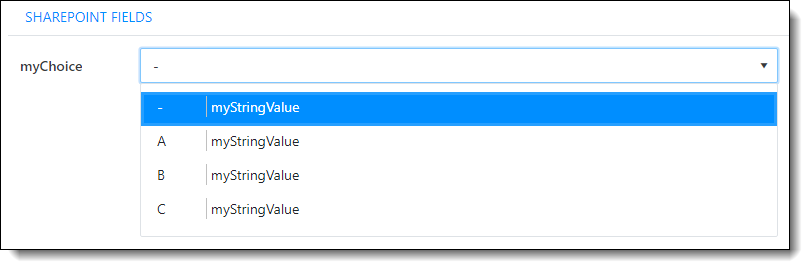
This is done by following function

fd.spRendered(function () { 

    function changeChoiceFieldDemo(fieldName) {
        
        myString = "myStringValue";
       
        var template = '';
        template += '<div style="white-space:nowrap;">';
        template += '<span style="'
            template += 'display: inline-block;'
            template += 'width:50px;'
            template += 'overflow: hidden;'
            template += 'white-space:nowrap;'
            template += 'text-overflow:ellipsis;'
            template += 'border-right: 1px solid silver;'
            template += '">'        
            template += '#: data # '
        template += '</span> ';
        
        template += '<span style="'
            template += 'display: inline-block;'
            template += 'width:250px;'
            template += 'overflow: hidden;'
            template += 'white-space:nowrap;'
            template += 'text-overflow:ellipsis;'
            template += '">'        
            template += '#: myString # '
        template += '</span> ';

        template += '</div>';
        
        fd.field(fieldName).widgetOptions = {
            template: template
        }
    }

    changeChoiceFieldDemo("myChoice");

    //renderForm();
});

However,
as you can see: the variable "myString" is globaly defined. If I change the code
from

myString = "myStringValue";

to

let myString = "myStringValue";

the function gives an error that the variable was not found, and the template is not excecuted... :frowning:

So my question is: how can I handle this problem?
Is it possible to use local variables in my function that I can use in the template?

Main goal is that I can use parameters in my function of course, something like

fd.spRendered(function () { 

    function changeChoiceFieldDemo(fieldName, myString) {
        
        //let myString = "myStringValue";
       
        var template = '';
        template += '<div style="white-space:nowrap;">';
        template += '<span style="'
            template += 'display: inline-block;'
            template += 'width:50px;'
            template += 'overflow: hidden;'
            template += 'white-space:nowrap;'
            template += 'text-overflow:ellipsis;'
            template += 'border-right: 1px solid silver;'
            template += '">'        
            template += '#: data # '
        template += '</span> ';
        
        template += '<span style="'
            template += 'display: inline-block;'
            template += 'width:250px;'
            template += 'overflow: hidden;'
            template += 'white-space:nowrap;'
            template += 'text-overflow:ellipsis;'
            template += '">'        
            template += '#: myString # '
        template += '</span> ';

        template += '</div>';
        
        fd.field(fieldName).widgetOptions = {
            template: template
        }
    }

    changeChoiceFieldDemo("myChoice", "this is what I want to show on my choice field");

    //renderForm();
});

Any help is appreciated,

Kind regards,
bartplessers
Hi @bartplessers,

It seems like you don't have to reference myString inside the template. I suggest simply appending its contents to the template like so:

template += '<span style="';
    template += 'display: inline-block;';
    template += 'width:250px;';
    template += 'overflow: hidden;';
    template += 'white-space:nowrap;';
    template += 'text-overflow:ellipsis;';
    template += '">';
    template += myString;
template += '</span> ';

This will work if you want the text to be the same in all options. Let me know if this approach works for you.

Hi @IliaLazarevskii ,

thanx again for you help.

However, my example above was a little bit simplified.

Basically I want

  1. get items from a sourcelist
  2. set all the options of the dropdown
  3. show some more info of the option (based on some other columns in the source list)

So my real function became...

    async function changeChoiceField(fieldName, listName, columnName, columnNameExtra) {

        // get values of choice field by looking in the source list
        let items = await pnp.sp.web.lists.getByTitle(listName).select(columnName, columnNameExtra).items.orderBy(columnName, true)();
        //console.log(items);

        // generic function to extract a column from a 2dim array
        function extractColumn(arr, column) {
            return arr.map(x => x[column])
        }
        
        // extract the correct column to get values for your choice field
        let myOptions = extractColumn(items, columnName);
        //console.log(myOptions);

        // set values of choice field
        fd.field(fieldName).widget.dataSource.data(myOptions);


        // TO DO
        // BUG: je kan nog niet werken met lokale variabelen in de template
        // zie ook
        // https://community.plumsail.com/t/choice-field-how-to-use-local-variables-in-widgetoptions-template/14960
        myColumnName = columnName;
        myColumnNameExtra = columnNameExtra;
        myItems = items;

        let template = '';
        //template += '#: console.log(data) # '
        template += '<div style="white-space:nowrap;">';
        template += '<span style="'
        template += 'display: inline-block;'
        template += 'width:150px;'
        template += 'overflow: hidden;'
        template += 'white-space:nowrap;'
        template += 'text-overflow:ellipsis;'
        template += 'border-right: 1px solid silver;'
        template += '">'
        template += '#: data # '
        template += '</span> ';

        template += '<span style="'
        template += 'display: inline-block;'
        template += 'width:550px;'
        template += 'overflow: hidden;'
        template += 'white-space:nowrap;'
        template += 'text-overflow:ellipsis;'
        template += '">'
        template += '#: myItems.find(item => item[myColumnName] == data)[myColumnNameExtra] # '
        template += '</span> ';

        template += '</div>';

        fd.field(fieldName).widgetOptions = {
            template: template
        }
    }

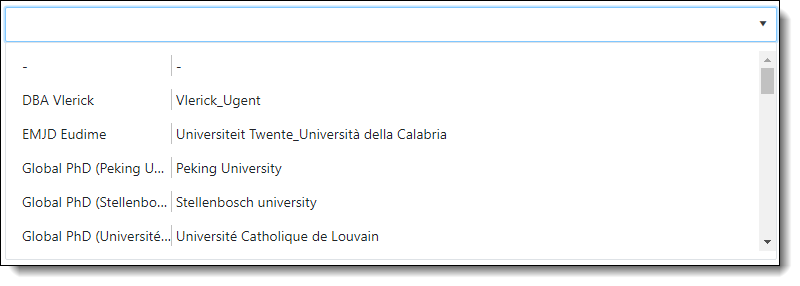
In the GUI, this results in

So I don't need static values, but a dynamic value, based on the 'data'

In

        template += '#: myItems.find(item => item[myColumnName] == data)[myColumnNameExtra] # '

I look in my 2-dim array of items and grab the value of 'myColumnNameExtra' were 'myColumnName' matches the current value of the option

But this does NOT work if I use local variables in the function

 items,columnName, columnNameExtra

That's why a set (for this demo purpose) the global vars myItmes,myColumnName, myColumnNameExtra to

        myItems = items;
        myColumnName = columnName;
        myColumnNameExtra = columnNameExtra;

This works great for one field on my form, but if I want to use my function to populatie more choicefields with different info from different lists, this gets a mess ofcours...

From the moment I change the above global vars to local vars with

        let myItems = items;
        let myColumnName = columnName;
        let myColumnNameExtra = columnNameExtra;

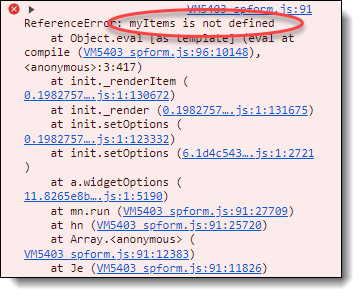
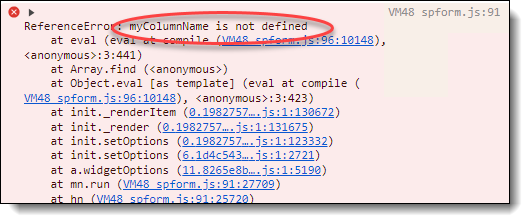
I receive error messages:
2024-08-16_11-32-49

2024-08-16_11-04-38

So the question remains: how to use local variables in templates?
Maybe, if this can't be used, you have some other suggestions how to change the templates dynamically, based on some parameters?

kind regards,
bartplessers

Hi @bartplessers,

I'm afraid using local variables inside a template like this is impossible since a locally defined variable might not be defined when the template is applied.

I suggest you look into Lookup fields, they are much better suited for tasks like this one.

Hi Ilia,

Sorry to be so stubborn on this... :slight_smile:
However, with the help of you and some colleagues (thanx, @asmita_adh !!!) , I have found a very nice solution!

I have some specific reasons why I keep insisting on using dropdown fields and why I not (always) want to use a lookdown field...
If I explain this a bit more, maybe you will understand me better

#1
Slight differences in user experience. You can argue about which is better, so I'm not going to dwell on this for too long

#2
More importantly, with a lookup field, your source data must always exist. If you delete a record in the source table that was referenced from the main table, you also delete the info in the main table!
You have irrevocably lost this information!!!
You can prevent this by enforcing "Enforce relationship behavior", but then you will not be able to delete the field.
You can work around this by, for example, adding an extra column to the source data (active: yes/no) and only showing the active records in the GUI of the lookup field. But if your data in the source list changes quite a bit over the years, you will eventually end up with a long list of source data with all irrelevant records.

#3
But perhaps most importantly:
Often, data comes from external data sources. Not only other SharePoint sites, but also via web services from completely different (line of business) data sources. You can't create lookup fields for this....

I certainly don't want to minimize the usefulness of lookupfields. On the contrary, I use them whenever I can.
But with the option to work with dropwdown fields and feed them with your own data, you get a huge range of new possibilities.
Because this is all possible in Plumsail forms, I'm such a big fan of it... :slight_smile:

Anyway, a long story short, I think I have found a nice solution...

For your reference, below is my code
Main idea:

  1. "fieldName" is an unbound Plumsail dropdown field

  2. you store the "key" of the selected option of the dropdown in a SharePoint txt field "fieldValue"
    Important: "fieldValue" is the "master" of the data. What is in it here is the truth. The dropdown field will adapt to this (see further).

  3. you populate your dropdown field with all "items" of "listName" (= your sourcedata)
    Important here: I do not only store the values op the options in my widget.dataSource, but I populate this with the full 2-dim array "items"
    (by doing this, I can reference any value of this "data" in my "template" without the need of global vars!!!)
    In example, below I have an array with 3 colums:
    -- key (the value I will store in my "fieldValue") (but will not be shown anywere in the dropdown)
    -- columnName (will be shown on dropdownfield and also in expanded dropdown)
    -- columnNameExtra (will also be shown in expanded dropdown)

  4. you check if the SharePoint txt field "fieldValue" contains a value. And if, set the option of the populated unbound dropdown to the accordingly option.

  5. and finally, add an "action" to the dropdown to populate the "fieldValue" with the new "key" if another options is choosen in the dropdown

So basically

  • I can create a dropdown that displays anything I want (even in a kind of a table format)
  • I store my own key in a speparate txt-field on sharepoint

This is the code:

    async function changeDropDownField_LinkedTxt(fieldName, fieldValue, listName, key, columnName, columnNameExtra) {

        // get values for choice field from list
        //let items = await pnp.sp.web.lists.getByTitle(listName).select(key, columnName, columnNameExtra).items.orderBy(columnName, true)();
        
        // large list, sort manually
        var items = await pnp.sp.web.lists.getByTitle(listName).select(key, columnName, columnNameExtra).items.getAll();
        // items = items.sort(dynamicSort(columnName));


        // set the options of the dropdown field
        fd.field(fieldName).widget.dataSource.data(items);
        fd.field(fieldName).widget.setOptions({ dataValueField: key, dataTextField: columnName });

        // find select value (stored in a corresponding text field) and set this option active 
        // get the options of the dropdown field
        let myOptions = extractColumn(items, key);
        let index = myOptions.indexOf(fd.field(fieldValue).value);
        fd.field(fieldName).widget.select(index);


        // add action to update the dropdown field
        function addAction(fieldName) {
            function myAction() {
                fd.field(fieldValue).value = fd.field(fieldName).value;
            }

            // Calling myAction value changes
            fd.field(fieldName).$on('change', myAction);

            // Calling myAction on form loading
            // myAction();

        }
        addAction(fieldName);


        // create template for custom rendering
        var template = '';
        //template += '#: console.log(data) # '
        template += '<div style="white-space:nowrap;">';
        template += '<span style="'
        template += 'display: inline-block;'
        template += 'width:150px;'
        template += 'overflow: hidden;'
        template += 'white-space:nowrap;'
        template += 'text-overflow:ellipsis;'
        template += 'border: 1px solid silver;'
        template += 'margin: 0;'
        template += 'padding: 0;'
        template += 'border-collapse: collapse;'
        template += '">'
        template += '#: data["' + columnName + '"] # '
        template += '</span> ';

        template += '<span style="'
        template += 'display: inline-block;'
        template += 'overflow: hidden;'
        template += 'white-space:nowrap;'
        template += 'text-overflow:ellipsis;'
        template += 'border: 1px solid silver;'
        template += 'margin: -10;'
        template += 'padding: -10;'
        template += 'border-collapse: collapse;'
        template += '">'
        template += '#: data["' + columnNameExtra + '"] # '
        template += '</span> ';
        template += '</div>';

        fd.field(fieldName).widgetOptions = {
            template: template
        }
    }


Again, thanx a lot for your input.
If you have any comments / optimalisation on above code: feel free to do so.

Kind regards,
bartplessers

PS.
As you can see above, I tried

        template += 'margin: -10;'
        template += 'padding: -10;'

but, result is still not fully what I want
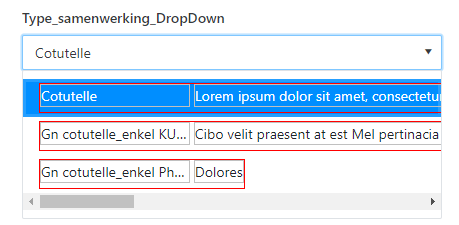
2024-08-20_15-25-17

Around the borders of my template div and spans there is still some white space...
Any idea to get rid of this? Does PlumSail uses css definitions? of is this done by inline styling? If not, maybe I can overrule the css-definition?