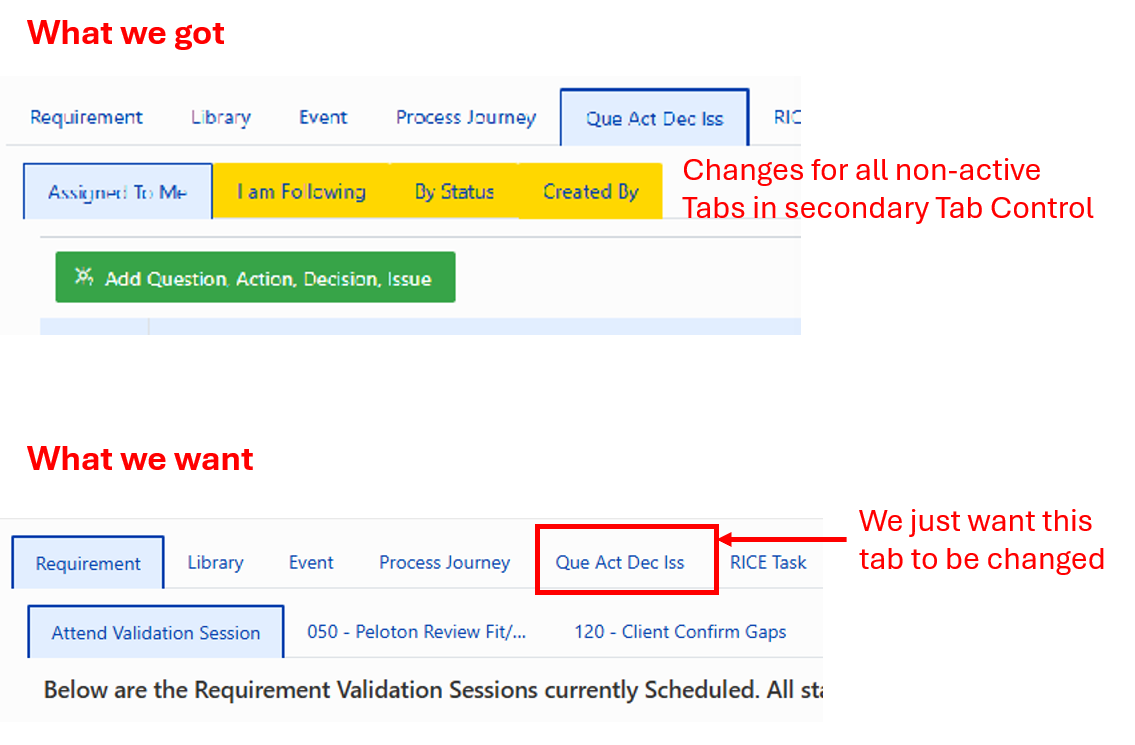
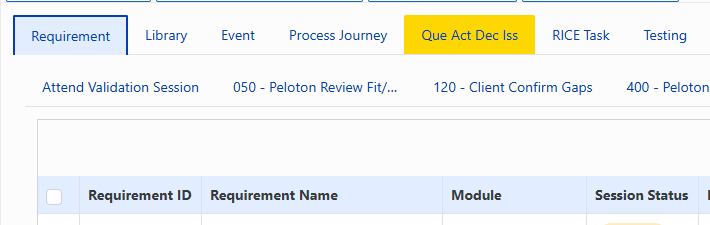
The form is rendered and all containers and controls are available.
fd.container('Tabs1') has 9 tabs (Tab0, Tab1, ....). We refer to these Tabs as the Primary Tabs.
On each Tab we have another Tab Control with a varying number of Tabs form 2 to 5 Tabs. We refer to these as the Secondary Tabs.
We want to conditionally set the background-color of Primary Tab4 in the fd.container('Tabs1').
The condition is if items in a control fd.control(Tab4Tab0List1) > 0 (i.e.: The List control that is in container Primary Tab4, container Secondary Tab0)
FAILED ATTEMPT (Tried numerous ways, here is the closest we got)
// Assume we already have the condition and the following code is wrapped in an IF statement
I am having trouble of the condition to set this CSS.
We want this set if the number of items in a fd.control(‘List’) > 0
This will allow the user to know that there are some items for them to work on without having to actually click on the Tab. If the Tab is gold, then there is something there for them to see.and work on.
We have tried the following to no avail:
    var listControl = fd.control('ListQADI');
    // var itemCount = listControl.value.length; //Broke Code
    // var itemCount = fd.control('ListQADI').aggregates.column1.count;
    // var itemCount = listControl.count;
    // let itemCount = dt.value.length;
    // let itemCount = listControl.widget.dataSource.data().length; // Broke the code
    // var itemCount = fd.control('ListQADI').value.length;