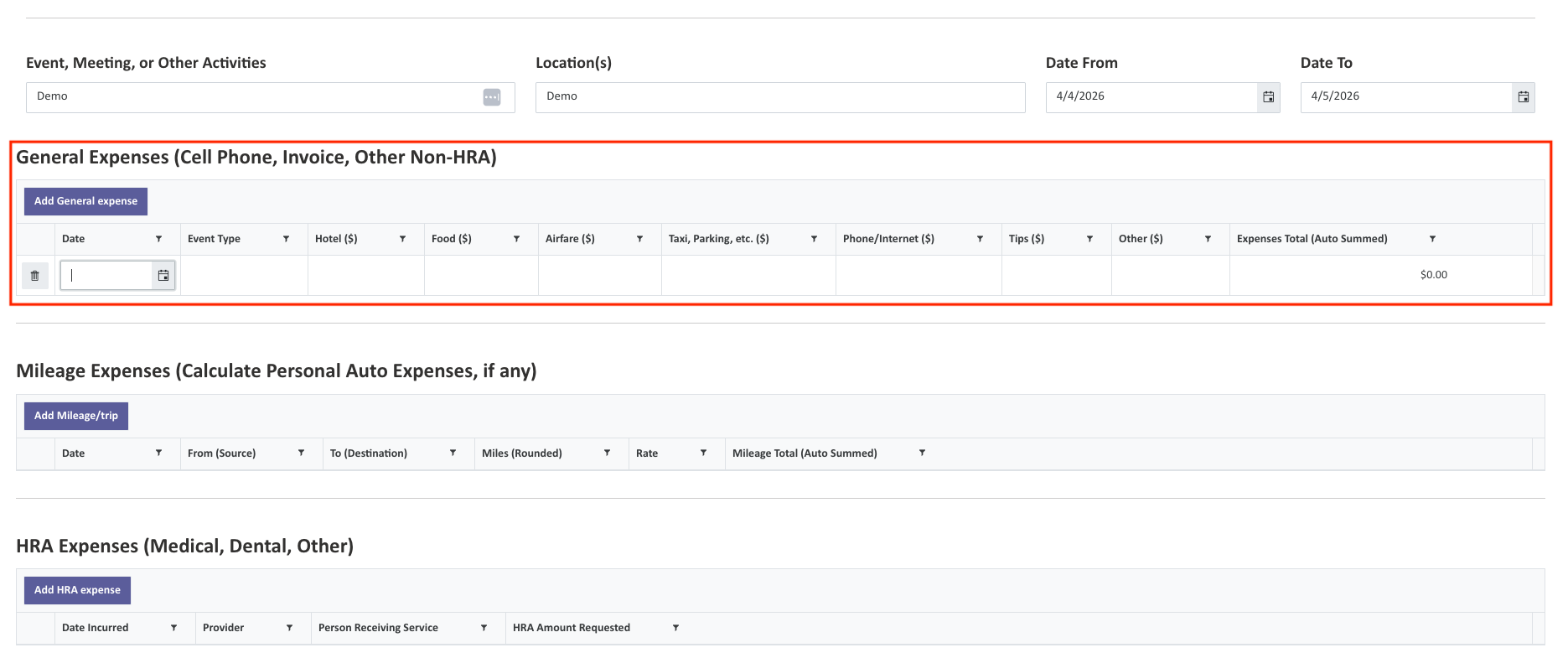
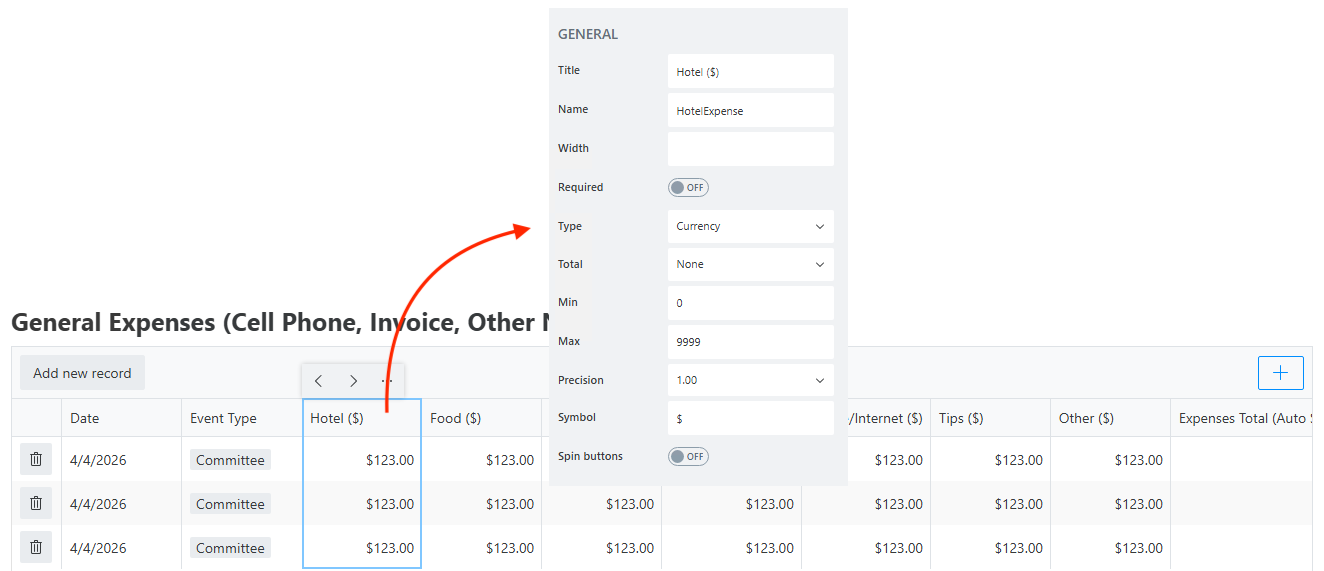
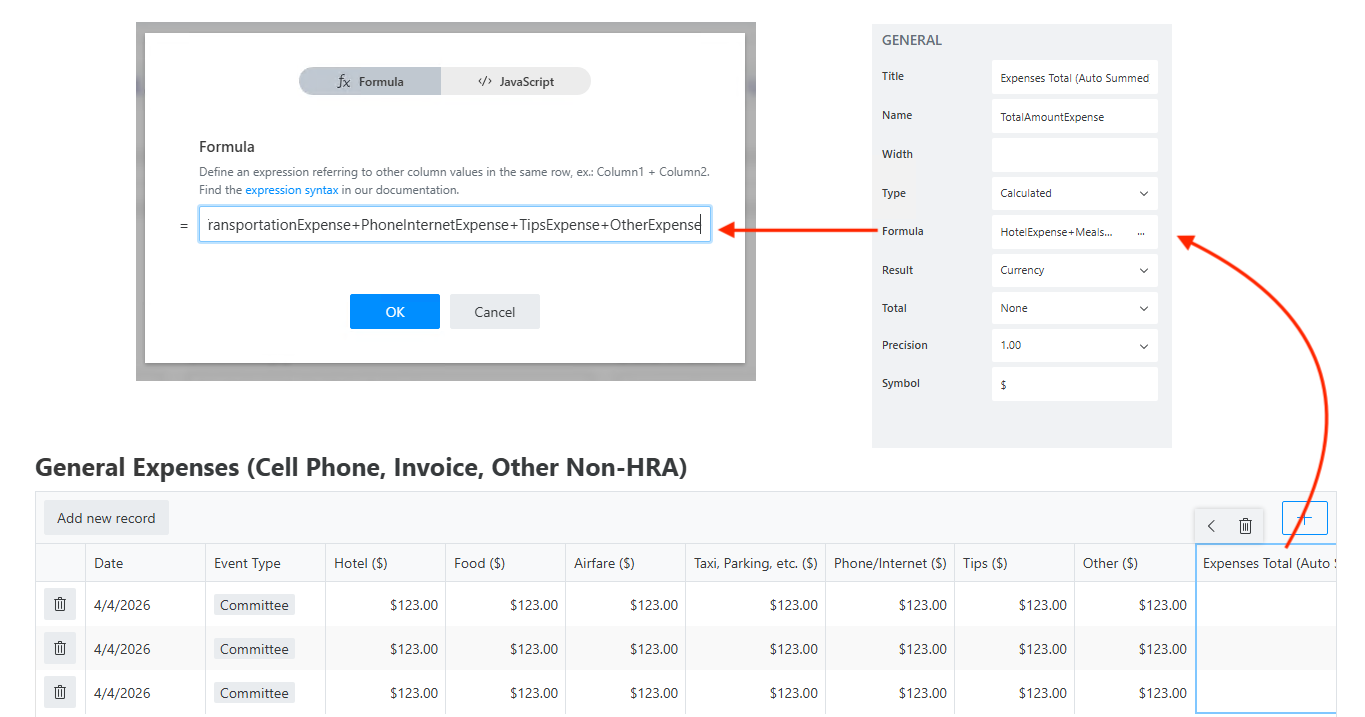
Sorry, @Nikita_Kurguzov , this is an authenticated form so I can’t share it. I can share some blocks in place that may offer some hints. This is not the complete JS file but shows several areas related to tab behavior.
// ======================================================================
// 01. Global Namespace + Flags + Redirect
// ======================================================================
window.cbc = window.cbc || {};

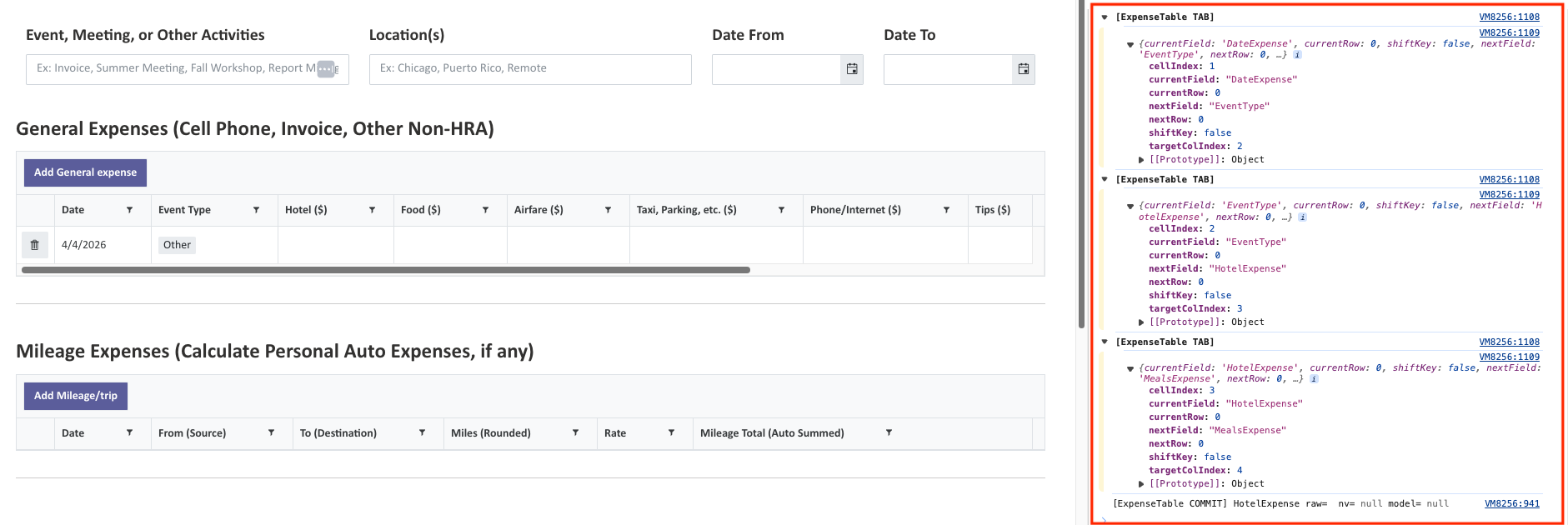
//THIS is a companion of the DEBUG in section 10., subsection  HARD TAB ORDER (ExpenseTable)
window.cbc._debugExpenseHardTab = true; // ← DEBUG TOGGLE (false is default OFF)

// Flags used for wizard + ARIA
window.cbc._navAttempted = false;   // set true when user tries to go NEXT
window.cbc._wizReverting = false;   // prevents re-entrant wizard on-change loops
window.cbc._ariaSync = window.cbc._ariaSync || {}; // hooks for programmatic error->ARIA sync

// Redirect after save (DEV list)
fd.spSaved(function (result) {
  result.RedirectUrl =
    'https://google.com';
});
// ==============================================================================
// Notification compatibility wrapper (Plumsail-safe) — This supports the TOAST
// ==============================================================================
window.cbc.notify = function (message, type) {
  try {
    var level = type || 'info';

    // ✅ Preferred: Plumsail notify/toast if available
    if (typeof fd.notify === 'function') {
      fd.notify(message, level);
      return;
    }
    if (typeof fd.toast === 'function') {
      fd.toast(message);
      return;
    }

    // ✅ Common fallback
    if (typeof fd.alert === 'function') {
      fd.alert(message);
      return;
    }

    // ✅ Guaranteed fallback
    alert(message);
  } catch (e) {
    alert(message);
  }
};

/* WORKS & DOES NOT BREAK JS, use for testing TOAST with no conditions

fd.spRendered(function () {
  setTimeout(function () {
    window.cbc.notify('✅ WRAPPER TEST: You should see this message.');
  }, 500);
});

*/


// Observe DOM once (wizard-safe)
fd.spRendered(function () {
    if (window.cbc._generalRequiredObserverInstalled) return;
    window.cbc._generalRequiredObserverInstalled = true;

    function attemptApply() {
        try {
            return window.cbc.applyGeneralRequiredVisibilityIfReady();
        } catch (e) {}
        return false;
    }

    setTimeout(attemptApply, 0);

    var root = document.querySelector('.fd-form') || document.body;
    try {
        var obs = new MutationObserver(function () {
            if (attemptApply()) {
                try { obs.disconnect(); } catch (e) {}
            }
        });
        obs.observe(root, { childList: true, subtree: true });
    } catch (e) {}
});


// ======================================================================
// 04. UI: Hide backend fields + inject scoped CSS
// ======================================================================
fd.spRendered(function () {
  function collapse(el) {
    if (!el) return;
    var $el = $(el);
    $el.closest('.fd-field').hide();
    var $col = $el.closest("[class*='col-']");
    if ($col.length) setTimeout(function () { $col.hide(); }, 0);
  }

  // Hide or lock fields that are backend-only or calculated
  ['Requester'].forEach(function (n) {
    var f = fd.field(n);
    if (f) { f.hidden = true; f.readOnly = true; collapse(f.$el); }
  });
  ['RequesterTxt'].forEach(function (n) {
    var c = fd.control(n);
    if (c) { c.hidden = true; collapse(c.$el); }
  });
  ['ReimbursementAmt'].forEach(function (n) {
    var f = fd.field(n);
    if (f) { f.hidden = true; collapse(f.$el); }
  });
  ['RunningExpenseTxt'].forEach(function (n) {
    var f = fd.field(n);
    if (f) { f.hidden = true; collapse(f.$el); }
  });
  ['RunningExpenseAmount_Display'].forEach(function (n) {
    var f = fd.field(n);
    if (f) { f.hidden = true; collapse(f.$el); }
  });

  ['RunningExpenseAmountCmn', 'AdjustedExpenseAmountCmn', 'TotalAdjustedExpenseAmountCmn']
    .forEach(function (n) {
      var f = fd.field(n);
      if (f) { f.hidden = true; f.readOnly = true; collapse(f.$el); }
    });

  // Display controls should remain visible
  ['RunningExpenseAmount_Display', 'AdjustedExpenseAmount_Display', 'TotalAdjustedExpenseAmount_Display']
    .forEach(function (n) {
      var c = fd.control(n);
      if (c) c.hidden = false;
    });

  // Inject CSS once (focus rings, attachments hint suppression, calculated badge)
  if (!document.getElementById('cbcCalcBadgeCss')) {
    var s = document.createElement('style');
    s.id = 'cbcCalcBadgeCss';
    s.textContent = [
      ".cbc-currency-wrap{display:flex;gap:16px;align-items:center}",
      ".cbc-calc-badge{font-size:16px;padding:3px 6px;border-radius:999px;background:#e6f4ea;color:#145a2a;border:1px solid #145a2a;font-weight:600}",
      "/* Hide the 'Drop files here to upload' hint text (Attachments only) */",
      ".cbc-attachments .k-dropzone em, .cbc-attachments .k-dropzone-hint{display:none !important}",
      "button:focus-visible, .k-button:focus-visible, [role='button']:focus-visible{outline:3px solid #054fb9;outline-offset:2px}",


"/* ==========================================================",
"   Responsive Data Table Width Control — SAFE FOR WIZARD",
"   Applies ONLY to table inner content, not layout containers",
"   ========================================================== */",

"/* Large / ultrawide screens only */",
"@media (min-width:1600px){",
"  .fd-field .k-grid{",
"    max-width:1200px;",
"  }",
"}",

"/* Normal screens: no constraint */",
"@media (max-width:1599px){",
"  .fd-field .k-grid{",
"    max-width:100%;",
"  }",
"}"


    ].join("\n");
    document.head.appendChild(s);
  }


});

// ======================================================================
// 05. UI: Rename "Add new record" buttons (Data Tables)
// ======================================================================
fd.spRendered(function () {
  function rename(table, text) {
    var c = fd.control(table);
    if (!c || !c.$el) return;

    function apply() {
      $(c.$el)
        .find("button,[role='button']")
        .filter(function (_, b) { return $(b).text().trim() === 'Add new record'; })
        .text(text);
    }

    apply();
    c.$on('change', function () { setTimeout(apply, 0); });
  }

  rename('ExpenseTable', 'Add General expense');
  rename('MileageTable', 'Add Mileage/trip');
  rename('MedicalTable', 'Add HRA expense');
});


// ✅ ExpenseTable calculations/edit handlers
fd.spRendered(function () {
  var expense = fd.control('ExpenseTable');
  if (!expense || !expense.widget) return;

  // Disable keyboard navigation on command (trash) column (prevents TAB focus steal)
  try {
    var grid0 = expense.widget;
    if (grid0 && !grid0._cbcCommandNavDisabled && Array.isArray(grid0.columns)) {
      grid0._cbcCommandNavDisabled = true;
      var cols0 = grid0.columns.slice();
      var changed0 = false;
      cols0.forEach(function (c) {
        if (c && c.command) {
          c.navigatable = false;
          changed0 = true;
        }
      });
      if (changed0 && typeof grid0.setOptions === 'function') {
        grid0.setOptions({ columns: cols0 });
      }
    }
  } catch (e) {}

  // ======================================================================
  // HARD TAB ORDER (ExpenseTable) — explicit field-to-field navigation (CAPTURE)
  // ----------------------------------------------------------------------
  // GOAL ORDER:
  //   DateExpense → EventType → HotelExpense → MealsExpense → AirfareExpense
  //   → TransportationExpense → PhoneInternetExpense → TipsExpense → OtherExpense
  //
  // Attempts to fix: "double tabbing" (Kendo also handling Tab) and Tab → Delete after currency.
  // We intercept Tab in CAPTURE phase and stopImmediatePropagation so only one
  // navigation action happens per key press.
  // ======================================================================
  if (!window.cbc._cbcExpenseHardTabCaptureInstalled) {
    window.cbc._cbcExpenseHardTabCaptureInstalled = true;

    var TAB_FIELDS = [
      'DateExpense',
      'EventType',
      'HotelExpense',
      'MealsExpense',
      'AirfareExpense',
      'TransportationExpense',
      'PhoneInternetExpense',
      'TipsExpense',
      'OtherExpense'
    ];

    function fieldToColIndex(grid, field) {
      if (!grid || !Array.isArray(grid.columns)) return -1;
      for (var i = 0; i < grid.columns.length; i++) {
        if (grid.columns[i] && grid.columns[i].field === field) return i;
      }
      return -1;
    }

    function getActiveCell(grid, target) {
  // Prefer the TD that contains the actual key event target (editor input).
  var $fromTarget = $(target).closest('td');
  if ($fromTarget && $fromTarget.length) return $fromTarget;

  var c = null;
  try { c = grid.current && grid.current(); } catch (e) {}
  var $c = $(c);
  if ($c && $c.length) return $c;
  return $fromTarget;
}


  function commitActiveEditor($cell, grid, field) {
  try {
    var $row = $cell.closest('tr');
    var model = null;
    try { model = (grid && typeof grid.dataItem === 'function') ? grid.dataItem($row) : null; } catch (e) {}

    // DropDownList (EventType)
    var $ddlEl = $cell.find('input,select').first();
    var ddl = null;
    try { ddl = $ddlEl.data('kendoDropDownList'); } catch (e) {}
    if (ddl) {
      try { ddl.close(); } catch (e) {}
      var dv = null;
      try { dv = ddl.value(); } catch (e) {}
      if (model && typeof model.set === 'function' && field) {
        try { model.set(field, dv); } catch (e) {}
      }
      try { ddl.trigger('change'); } catch (e) {}
      try { $ddlEl.trigger('blur'); } catch (e) {}
      try { $ddlEl.trigger('change'); } catch (e) {}
      return;
    }

    // NumericTextBox (currency) — aggressively harvest value candidates
    var ntb = null;
    try {
      var ae = document.activeElement;
      if (ae) {
        ntb = $(ae).data('kendoNumericTextBox');
        if (!ntb) {
          ntb = $(ae).closest('.k-numerictextbox,.k-numeric-wrap,.k-numerictextbox').find('input').data('kendoNumericTextBox');
        }
      }
    } catch (e) {}

    if (!ntb) {
      try {
        $cell.find('input').each(function () {
          if (ntb) return;
          var w = $(this).data('kendoNumericTextBox');
          if (w) ntb = w;
        });
      } catch (e) {}
    }

    function pickNumberFromCandidates(cands) {
      for (var i = 0; i < cands.length; i++) {
        var v = cands[i];
        if (v === null || v === undefined) continue;
        if (typeof v === 'number' && !isNaN(v)) return v;
        var s = String(v).trim();
        if (!s) continue;
        var n = toNumber(s);
        if (s !== '' && !isNaN(n)) return n;
      }
      return null;
    }

    if (ntb) {
      // Force widget to flush its internal value buffer
      try { if (typeof ntb._change === 'function') ntb._change(); } catch (e) {}

      var candidates = [];
      try { candidates.push(ntb.value()); } catch (e) {}
      try { if (ntb._text) candidates.push(ntb._text); } catch (e) {}
      try { if (ntb._input && ntb._input.val) candidates.push(ntb._input.val()); } catch (e) {}
      try { if (ntb.element) candidates.push($(ntb.element).val()); } catch (e) {}
      try { if (ntb.wrapper) candidates.push(ntb.wrapper.find('input:visible').val()); } catch (e) {}

      // Any inputs inside the cell (including aria-valuenow)
      try {
        $cell.find('input').each(function () {
          candidates.push(this.value);
          var av = this.getAttribute('aria-valuenow');
          if (av) candidates.push(av);
          var attrv = this.getAttribute('value');
          if (attrv) candidates.push(attrv);
        });
      } catch (e) {}

      var nv = pickNumberFromCandidates(candidates);

      // Push back into widget + model
      try { ntb.value(nv); } catch (e) {}
      try { ntb.trigger('change'); } catch (e) {}

      if (model && typeof model.set === 'function' && field) {
        try { model.set(field, nv); } catch (e) {}
      }

      // Blur the underlying element to mimic click-away
      try { if (ntb.element) $(ntb.element).trigger('blur'); } catch (e) {}

      if (window.cbc._debugExpenseHardTab === true) {
        try { console.log('[ExpenseTable COMMIT]', field, 'nv=', nv, 'model=', (model && model.get ? model.get(field) : null), 'candidates=', candidates); } catch (e) {}
      }
      return;
    }

    // Generic editors
    var $input = $cell.find('input,select,textarea').first();
    if ($input.length) {
      try { $input.trigger('blur'); } catch (e) {}
      try { $input.trigger('change'); } catch (e) {}
    }
  } catch (e) {}
}


function handleHardTab(evt) {
  if (!(evt.key === 'Tab' || evt.keyCode === 9)) return;

  // ✅ Guard against key-repeat (holding TAB even briefly can fire multiple keydowns)
  if (evt.repeat === true) {
    evt.preventDefault();
    evt.stopPropagation();
    if (evt.stopImmediatePropagation) evt.stopImmediatePropagation();
    return;

 // ✅ Debounce: ignore TAB events fired too close together
 var nowTs = Date.now();
 if (window.cbc._lastExpenseTabTs && (nowTs - window.cbc._lastExpenseTabTs) < 80) {
   evt.preventDefault();
   evt.stopPropagation();
   if (evt.stopImmediatePropagation) evt.stopImmediatePropagation();
   return;
 }
 window.cbc._lastExpenseTabTs = nowTs;
  }

  var exp = fd.control('ExpenseTable');
  if (!exp || !exp.$el || !exp.widget) return;
  if (!exp.$el.contains(evt.target)) return;

  var grid = exp.widget;
  if (!grid) return;

  // Prevent re-entrancy
  if (window.cbc._cbcExpenseHardTabBusy) {
    evt.preventDefault();
    evt.stopPropagation();
    if (evt.stopImmediatePropagation) evt.stopImmediatePropagation();
    return;
  }

  var $cell = getActiveCell(grid, evt.target);
  if (!$cell || !$cell.length) return;


      var cellIndex = ($cell[0] ? $cell[0].cellIndex : null);
      if (cellIndex === null) return;

      var col = (Array.isArray(grid.columns) ? grid.columns[cellIndex] : null);
      var field = col ? col.field : null;
      if (!field || TAB_FIELDS.indexOf(field) === -1) return;

      var goingBack = !!evt.shiftKey;
      var pos = TAB_FIELDS.indexOf(field);
      var nextPos = goingBack ? (pos - 1) : (pos + 1);

      var $row = $cell.closest('tr');
      var $rows = grid.tbody ? $(grid.tbody).find('tr') : $row.parent().find('tr');
      var rowIdx = $rows.index($row);

      var targetRowIdx = rowIdx;
      var targetField = null;

      if (nextPos < 0) {
        if (rowIdx <= 0) return; // allow shift-tab out
        targetRowIdx = rowIdx - 1;
        targetField = TAB_FIELDS[TAB_FIELDS.length - 1];
      } else if (nextPos >= TAB_FIELDS.length) {
        if (rowIdx >= ($rows.length - 1)) return; // allow tab out
        targetRowIdx = rowIdx + 1;
        targetField = TAB_FIELDS[0];
      } else {
        targetField = TAB_FIELDS[nextPos];
      }

      var colIdx = fieldToColIndex(grid, targetField);
      if (colIdx < 0) return;

      var $targetRow = $rows.eq(targetRowIdx);
      var $targetCell = $targetRow.children('td').eq(colIdx);


// ---------------- DEBUG: schema drift / column mismatch ----------------
if (window.cbc._debugExpenseHardTab === true && !$targetCell.length) {
  console.warn('[ExpenseTable TAB] target cell not found', {
    targetField,
    targetRowIdx,
    colIdx
  });
}
// ----------------------------------------------------------------------

if (!$targetCell.length) return;

// Track last intended target to recover from Kendo focusing the command (trash) button
window.cbc._lastExpenseHardTabAt = Date.now();
window.cbc._lastExpenseHardTabTarget = $targetCell;


// ---------------- DEBUG (optional) ----------------
// To use: set window.cbc._debugExpenseHardTab = true;
if (window.cbc._debugExpenseHardTab === true) {
  try {
    console.groupCollapsed('[ExpenseTable TAB]');
    console.log({
      currentField: field,
      currentRow: rowIdx,
      shiftKey: evt.shiftKey === true,
      nextField: targetField,
      nextRow: targetRowIdx,
      cellIndex: cellIndex,
      targetColIndex: colIdx
    });
    console.groupEnd();
  } catch (e) {}
}
// --------------------------------------------------


      // Fully consume Tab so Kendo cannot also process it
      evt.preventDefault();
      evt.stopPropagation();
      if (evt.stopImmediatePropagation) evt.stopImmediatePropagation();

      window.cbc._cbcExpenseHardTabBusy = true;

setTimeout(function () {
  try {
    // Commit current cell (our commit handles NumericTextBox flushing)
    commitActiveEditor($cell, grid, field);
    if (typeof grid.saveCell === 'function') {
      grid.saveCell($cell);
    } else if (typeof grid.closeCell === 'function') {
      grid.closeCell();
    }
  } catch (e) {}

  setTimeout(function () {
    try {
      if (typeof grid.editCell === 'function') grid.editCell($targetCell);
      else $targetCell.trigger('click');
    } catch (e) {}
    window.cbc._cbcExpenseHardTabBusy = false;
  }, 60);

}, 0);


    }


// Prevent command (trash) button from stealing focus after TAB from currency
if (!window.cbc._expenseCommandFocusRedirectInstalled) {
  window.cbc._expenseCommandFocusRedirectInstalled = true;
  document.addEventListener('focusin', function (e) {
    try {
      var exp2 = fd.control('ExpenseTable');
      if (!exp2 || !exp2.$el || !exp2.widget) return;
      if (!exp2.$el.contains(e.target)) return;

      var $t = $(e.target);
      var isCmd = $t.closest('td.k-command-cell').length || $t.is('a.k-grid-delete, a.k-grid-remove, button.k-grid-delete, button.k-grid-remove');
      if (!isCmd) return;

      var at = window.cbc._lastExpenseHardTabAt || 0;
      if (!at || (Date.now() - at) > 800) return;

      var $dest = window.cbc._lastExpenseHardTabTarget;
      if (!$dest || !$dest.length) return;

      setTimeout(function () {
        try { exp2.widget.editCell($dest); } catch (ex) { try { $dest.trigger('click'); } catch (ex2) {} }
      }, 0);
    } catch (ex) {}
  }, true);
}
// Capture-phase keydown so Kendo doesn't also handle Tab
    document.addEventListener('keydown', handleHardTab, true);
  }

  // ======================================================================
  var FIELDS = [
    'HotelExpense', 'MealsExpense', 'AirfareExpense',
    'TransportationExpense', 'PhoneInternetExpense',
    'TipsExpense', 'OtherExpense'
  ];

  function recalc(r) {
    setVal(r, 'TotalAmountExpense',
      round2(FIELDS.reduce(function (s, f) { return s + toNumber(getVal(r, f)); }, 0))
    );
  }


// --------------------------------------------------------------
// TAB focus jump: update row totals on cellClose (not on blur)
// --------------------------------------------------------------
if (expense.widget && !expense.widget._cbcCellCloseExpenseTotalsWired) {
  expense.widget._cbcCellCloseExpenseTotalsWired = true;

  expense.widget.bind('cellClose', function (e) {
    try {
      if (!e || !e.sender || !e.container || !e.model) return;

      // Identify which column is closing (more reliable than data-field in some builds)
      var grid = e.sender;
      var cellIndex = (e.container[0] ? e.container[0].cellIndex : null);
      var col = (cellIndex !== null && grid.columns) ? grid.columns[cellIndex] : null;
      var field = col ? col.field : null;

      // Only run for the currency amount columns we total
      if (!field || FIELDS.indexOf(field) === -1) return;

      // Defer one tick so Kendo finishes moving focus (prevents Tab jump)
      setTimeout(function () {
        // Recalculate the row total safely
        var total = round2(FIELDS.reduce(function (s, f) {
          return s + toNumber(getVal(e.model, f));
        }, 0));

        setVal(e.model, 'TotalAmountExpense', total);

        // Now update overall totals
        recalcTotalsSoon();
      }, 0);

    } catch (ex) {}
  });
}


expense.$on('edit', function (e) {
  if (!e || !e.column) return;
  if (FIELDS.indexOf(e.column.field) === -1) return;

  setTimeout(function () {
    var $i = e.container.find('input').first();
    if (!$i.length) return;

    var ntb = $i.data('kendoNumericTextBox');


// Do NOT update row totals during blur/change.
// Doing so can redraw the row mid-TAB and force focus to the Delete command.
// We only recalc overall totals here; row totals are updated in cellClose (below).
var commit = function () {
  setTimeout(function () {
    recalcTotalsSoon(); // overall totals only
  }, 0);
};


//binding
    $i.off('.cbcExp').on('blur.cbcExp change.cbcExp', commit);
    if (ntb) ntb.bind('change', commit);

  }, 0);
});


// Do NOT recalc all row totals on every grid change.
// That redraws rows during TAB-out from NumericTextBox and focus snaps to Delete.
// Row totals are updated in cellClose; this handler should only handle
// add/remove row scenarios and general UI refresh.
expense.$on('change', function () {
  try {
    var rows = getRows(expense);
    var count = rows.length;

    // Only recalc ALL rows when rows were added/removed
    // (not when a currency cell value changed).
    if (window.cbc._lastExpenseRowCount === undefined) {
      window.cbc._lastExpenseRowCount = count;
    }

    var rowCountChanged = (count !== window.cbc._lastExpenseRowCount);
    window.cbc._lastExpenseRowCount = count;

    if (rowCountChanged) {
      // Safe to recalc totals across rows after add/delete
      rows.forEach(recalc);
    }

  } catch (e) {}

  // Always update overall totals + required field visibility
  recalcTotalsSoon();
  window.cbc.updateGeneralRequiredVisibility();
});


  setTimeout(function () { getRows(expense).forEach(recalc); }, 0);
});

fd.spRendered(function () {
  var medical = fd.control('MedicalTable');
  if (!medical || !medical.widget) return;

  var AMT_FIELD = 'MedicalAmountRequested';

  medical.$on('edit', function (e) {
    if (!e || !e.model) return;
    if (!e.column || e.column.field !== AMT_FIELD) return;

    setTimeout(function () {
      var $i = e.container.find('input').first();
      if (!$i.length) return;
      var ntb = $i.data('kendoNumericTextBox');
      var commit = function () { recalcTotalsSoon(); };

      $i.off('.cbcMed').on('blur.cbcMed change.cbcMed', commit);
      if (ntb) ntb.bind('change', commit);
    }, 0);
  });


medical.$on('change', function () {
  recalcTotalsSoon();

  // IMPORTANT: defer until Kendo finishes committing delete
  setTimeout(function () {
    window.cbc.updateGeneralRequiredVisibility();
  }, 0);
});


/*   medical.$on('change', function () { recalcTotalsSoon(); });  */
  setTimeout(function () { recalcTotalsSoon(); }, 0);

});


// ======================================================================
// Remove ExpenseTable Delete button from keyboard tab order
// ----------------------------------------------------------------------
// Reason:
// - Delete is a focusable <a role="button"> inside a command cell
// - Browser TAB reaches it before Kendo Grid navigation runs
// - navigate/editCell cannot intercept this
//
// This preserves:
// ✅ Currency values
// ✅ Native Kendo incell commit
// ✅ Predictable TAB order
// ✅ Accessibility (Delete remains clickable)
// ======================================================================
fd.spRendered(function () {
  var expense = fd.control('ExpenseTable');
  if (!expense || !expense.$el) return;

  function removeDeleteFromTabOrder() {
    $(expense.$el)
      .find('td.k-command-cell a, td.k-command-cell button')
      .attr('tabindex', '-1')
      .attr('aria-hidden', 'true');
  }

  // Initial pass
  setTimeout(removeDeleteFromTabOrder, 0);

  // Re-apply after grid refreshes (add/delete rows)
  if (expense.widget && expense.widget.bind) {
    expense.widget.bind('dataBound', function () {
      setTimeout(removeDeleteFromTabOrder, 0);
    });
  }
});


// ======================================================================
// 17. Accessibility: Meeting/Event/Date ARIA sync + WorkState single-tab fix
// ======================================================================
window.cbc.syncMeetingEventAria = function () {
  if (!window.cbc._navAttempted) return;

  ['MeetingAttended', 'EventLocation', 'DateFrom', 'DateTo'].forEach(function (name) {
    var f = fd.field(name);
    if (!f || !f.$el) return;

    var $input = $(f.$el).find('input,select,textarea').first();
    if (!$input.length) return;

    var $err = $(f.$el).find('.fd-error-message:visible').first();
    if (f.error && $err.length) {
      if (!$err.attr('id')) $err.attr('id', name + '-error');
      $input.attr({ 'aria-describedby': $err.attr('id'), 'aria-invalid': 'true' });
    } else {
      $input.removeAttr('aria-describedby aria-invalid');
    }
  });
};


// WorkState — Single TAB behavior (capture-phase handler)
fd.spRendered(function () {
  if (window.cbc._workStateSingleTabInstalled) return;
  window.cbc._workStateSingleTabInstalled = true;

  function focusField(field) {
    if (!field || !field.$el) return;
    var $i = $(field.$el)
      .find('input,select,textarea,[tabindex]')
      .filter(':visible')
      .first();
    if ($i.length) $i.focus();
  }

  document.addEventListener('keydown', function (e) {
    var isTab = (e.key === 'Tab' || e.keyCode === 9);
    if (!isTab) return;

    var ws = fd.field('WorkState');
    if (!ws || !ws.$el) return;

    var root = ws.$el;
    if (!root || !root.contains(e.target)) return;

    var isPreviewButton = !!(e.target && e.target.matches && e.target.matches('button.fd-dropdown-option-preview.k-button'));
    var isAnyFocusableInside = true;

    if (isPreviewButton || isAnyFocusableInside) {
      e.preventDefault();
      if (e.shiftKey) {
        focusField(fd.field('WorkCity'));
      } else {
        focusField(fd.field('WorkZip'));
      }
    }
  }, true);
});

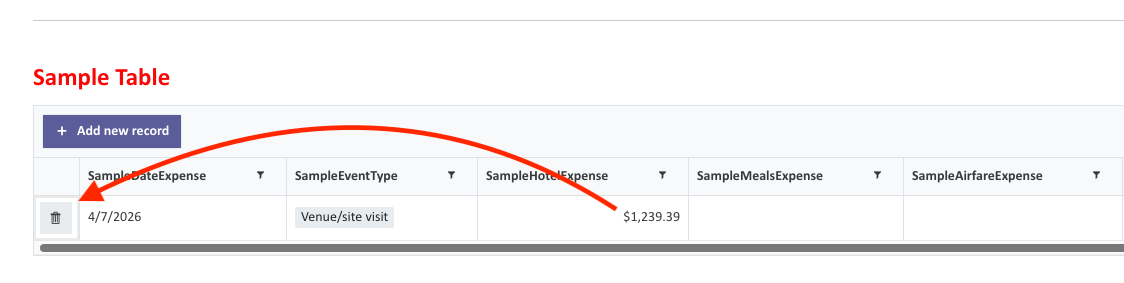
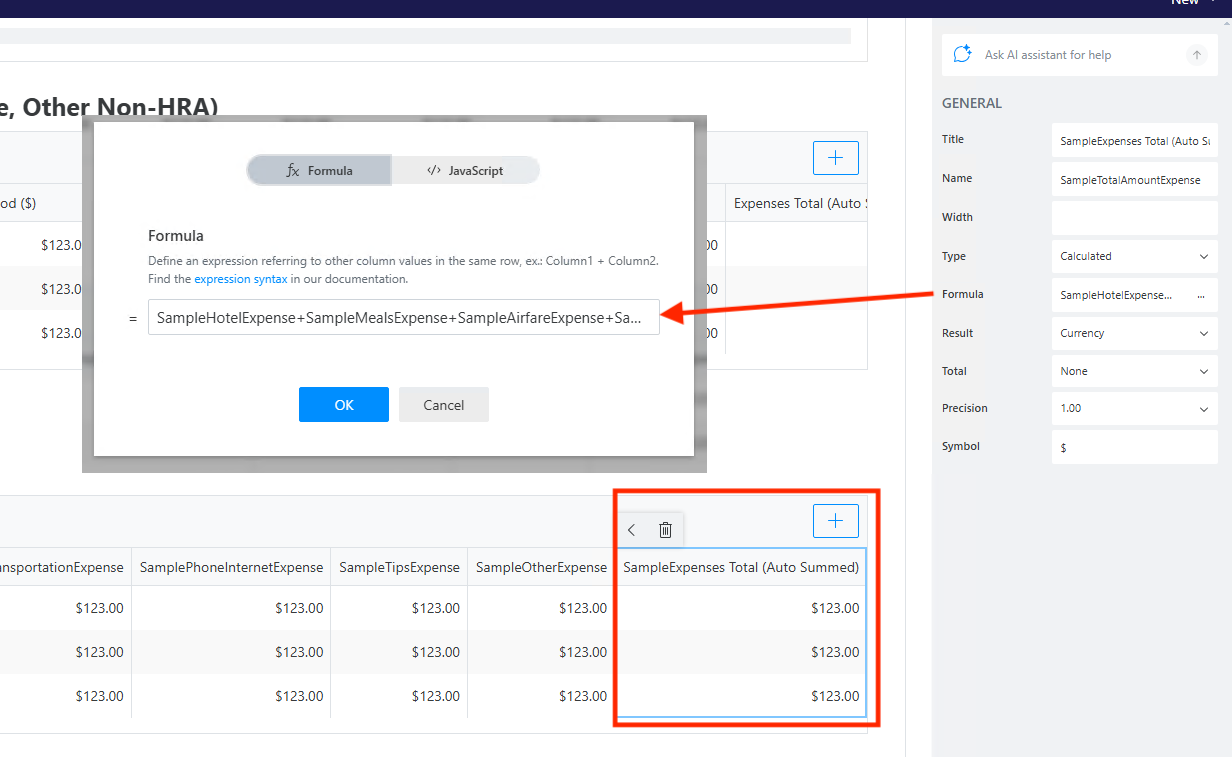
 Your experiment confirms this perfectly:
 tab jumps to trash icon
 . I need to stand up a public SharePoint site to so this; all our sites are private. I will see what I can do. Thank you as always.