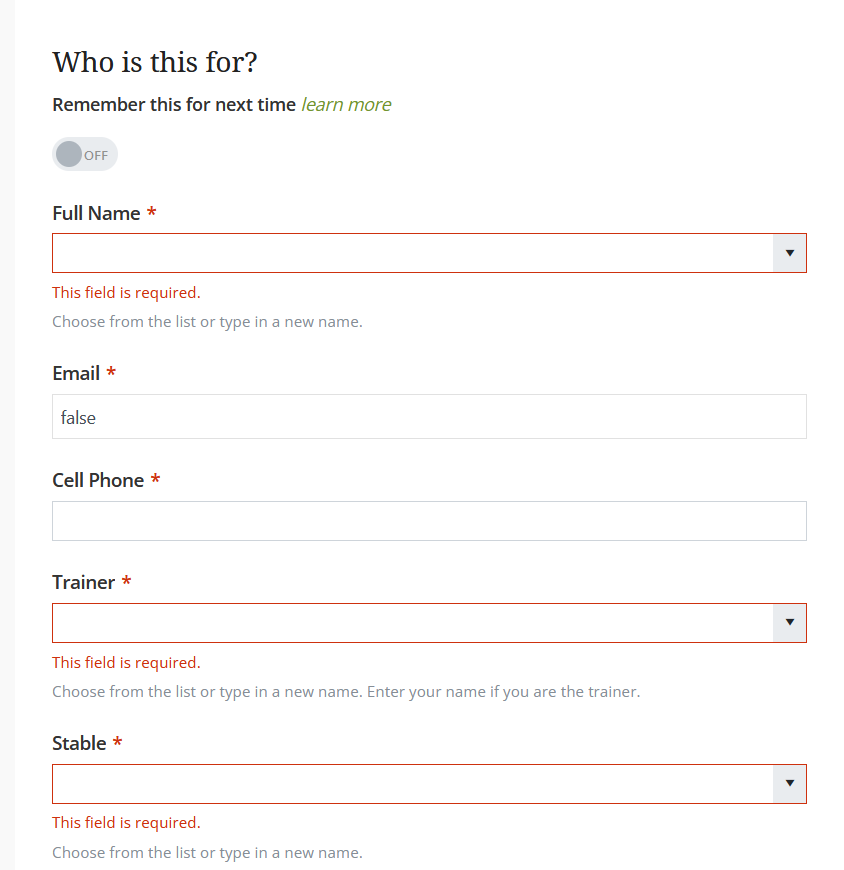
We are seeing a recent change in behavior causing cosmetic issues.
Drop down fields with 'Allow user value' set true are showing validation errors upon form load. Normally these errors are not displayed until the form is validated.
Please see the attached image.
We noticed that drop down fields based on static lists now have a new fancy list styler. Perhaps this new field functionality has inadvertently caused this change in behavior?
We would prefer that the original behavior be restored, if possible.
Thank you.
Hi @chs-web,
This is a bug that we've already made a hotfix for. Could you try clearing the browser's cache and re-opening the form?
Hi Ilia.
We are still seeing this unfortunately, even after deleting the browser cache and when that did not work, trying an inPrivate window.
We have also seen some odd recent behavior with static drop down controls in general. In addition sometimes showing validation errors unexpectedly, they sometimes return data with a CR character appended to the value. For example, in a State/Province drop down, a value of 'CA' will be returned as 'CA\r'. This has broken some of our Power Automate flows.
I have not been able to precisely determine when and how this happens. It seems to occur when reloading the form. The form remembers the submission in-progress (partially filled data), and everything looks fine after reloading, but it maybe this is where the issue occurs?
Thanks,
Gary