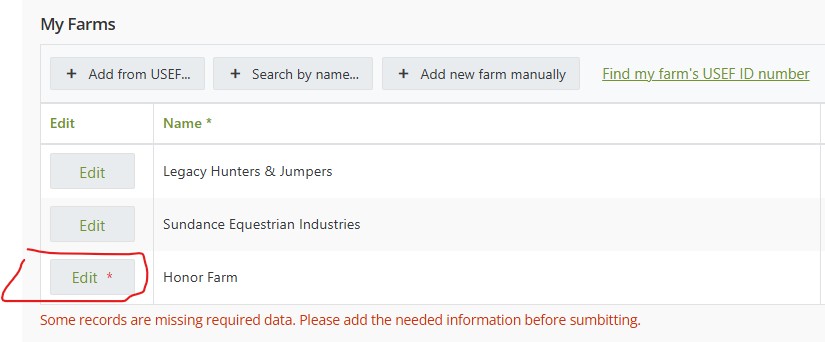
Hi Margo, thank you.
For context, we have forms using data tables to store private information, and so we have hidden certain columns and overridden the edit function to use our own edit form.
We use a calculated column to create an “Edit” button in the table. We want that button to indicate when there is required data missing from any of the hidden columns. Here is what we have so far:
The code behind for this looks like so:
if (!data.Organization ||
    ((!isFlagSet(data.Privacy, Privacy.EMAIL)) && (!data.Email)) ||
    ((!isFlagSet(data.Privacy, Privacy.PHONE)) && (!data.Phone)) ||
    ((!isFlagSet(data.Privacy, Privacy.ADDRESS)) && (!data.Address)) ||
    ((!isFlagSet(data.Privacy, Privacy.CITY)) && (!data.City)) ||
    ((!isFlagSet(data.Privacy, Privacy.STATE)) && (!data.State)) ||
    ((!isFlagSet(data.Privacy, Privacy.ZIP)) && (!data.Zip)))  {
        return '<a role="button" class="k-button chs-row-edit-button" href="javascript:void(0)" onClick="editDTRow(\'' + data.uid + '\')">Edit<span style="color: #df3f3f;">*</span></a>';
    } else {
        return '<a role="button" class="k-button chs-row-edit-button" href="javascript:void(0)" onClick="editDTRow(\'' + data.uid + '\')">Edit</a>';
}
As you can see we are returning HTML markup.
(Privacy is a number column that contains a bitmask to indicate which of the columns contain private information and are thus not editable. It’s not really relevant for this discussion, but the upshot is we only care about missing information when the user can edit it.)
Here is the function that updates the table row from our custom edit form:
// Validate form and update edited row
window.updateRowData = async function() {
    console.log('updateRowData');
    if (await validateEditForm()) {
        let dt = fd.control('MyOrganizations');
        let dtRows = dt.value;

        if(rowData.uid) {
            // Updating an existing row
            // Find the row we need to change
            for (let i = 0; i < dt.value.length; i++) {
                if (dt.value[i].get('uid') == rowData.uid) {
                    dt.value[i].set('Organization', fd.field('Organization').value);
                    dt.value[i].set('USEFNo', fd.field('USEFNo').value);
                    if (!isFlagSet(rowData.Privacy, Privacy.EMAIL)) { dt.value[i].set('Email', fd.field('Email').value) };
                    if (!isFlagSet(rowData.Privacy, Privacy.PHONE)) { dt.value[i].set('Phone', fd.field('Phone').value) };
                    if (!isFlagSet(rowData.Privacy, Privacy.ADDRESS)) { dt.value[i].set('Address', fd.field('Address').value) };
                    if (!isFlagSet(rowData.Privacy, Privacy.CITY)) { dt.value[i].set('City', fd.field('City').value) };
                    if (!isFlagSet(rowData.Privacy, Privacy.STATE)) { dt.value[i].set('State', fd.field('State').value) };
                    if (!isFlagSet(rowData.Privacy, Privacy.ZIP)) { dt.value[i].set('Zip', fd.field('Zip').value) };
                }
            }
        } else {
            // Adding a new row
            let newRow = [{
                Organization: fd.field('Organization').value,
                USEFNo: fd.field('USEFNo').value,
                Email: fd.field('Email').value,
                Phone: fd.field('Phone').value,
                Address: fd.field('Address').value,
                City: fd.field('City').value,
                State: fd.field('State').value,
                Zip: fd.field('Zip').value,
                Privacy: Privacy.NONE
                }
            ];
            dtRows.push(newRow[0]);
        }
        showEditForm(false);
        $('.edit-form-invalid').css('display', 'none');
    } else {
        $('.edit-form-invalid').css('display', 'block');
    }
}
Are you suggesting that we can simply set the Edit column value with the correct HTML markup here? Will that break the calculated column code in any way?