For some reason, certain Y/N fields are not saving form values after creating a new item. Fields marked as YES when adding the item in a form are appearing as NO when validating by viewing the item in SharePoint list.
This is a new development for a form that was previously working fine.
There is no JavaScript in the New form. Have tried removing the field/saving form/adding field back and saving again with no success.
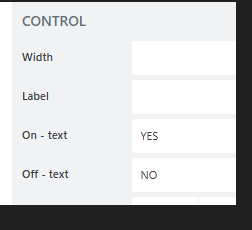
Have confirmed that the control is configured correctly:
I remember I opened a ticket once with Plumsail too about this issue. What helped me was, to create a new list. Until now, I do not know what happened, but the behavior was the same.
Assuming it was due to creating a list with powershell (unconfirmed).
Hope you are at the beginning of the development of your solution so you can start fresh with the new list
Thank you for the reply @StepanS . This list was created manually, not from PowerShell. Unfortunately this is in a production site and creating a new list is not an option. Will work with Plumsail support to find a resolution.
In case someone faces a similar problem in the future, the key to solving this issue was to disable a Power Automate flow that was triggering for each submission and erasing the field values.
The PA connections of a given list can be checked as described here: