I have been chasing this all day and finally decided to ask.
I have several List or Library (LOL) Controls, each I have working and for the most part styled how I want them. While performing some user testing and final checks, there are some design and function elements that I would like to improve. I welcome any ideas out there.
Goals
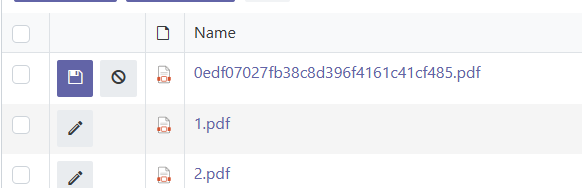
Reveal (show) the Refresh icon at the right of each control
They are gray boxes presently
Implement a better way to "Save", "Submit", or "Write" values
Currently, I can just click the gray Refresh box to commit the changes to the child LOL and that is very clunky; users will complain
Flag/highlight required fields upon file upload
I want users to immediately address the required fields before moving away from the control
I already use validators that throw an error upon parent form save, but I'd like something more immediate if possible
I have backed Power Automate flows that rename the file and there is a timing component
Your questions are good - and helpful to me too, as explaining them also is useful to strengthen my own understanding.
When the user uploads a file, there are three fields that I require that add information about the upload content.
If the user does not address the required fields quickly, my Power Automate Flow to rename the upload file fails. It's all about the rename and timing.
As shown in the video snippet, if I DO NOT hit the gray/refresh box, the Media Description field remains in edit and does not complete. Sometimes I can click out of the control to simulate the user moving onto another task on the form - to recreate the scenario where they forget or avoid completing the required fields. The validators I have in place will flag the users ultimately when they attempt to SAVE/SUBMIT the parent form, but by then it's too late and the PA Flow has run and not renamed the file.
You can add a custom button to the toolbar that will refresh the control with the Save icon instead of teh refresh. See the documentation for the code examples: Work with buttons on the toolbar of a List or Library
I have gone through my entire CSS document. The very last thing I tried fixed the missing Refresh button problem. BUT it created another problem that the CSS had solved for another requrement.
/* This was used to hide the PDF icon
as we don't want users to create a PDF */

i.ms-Icon.ms-Icon {
    display: none;
}
I left the "i" in the i.ms-Icon.ms-Icon--PDF line above to show a before/after. Plumsail flags that "i" as being over qualified and can be removed. Like so:
 /* HIDE PDF icon */

 .ms-Icon.ms-Icon--PDF {
    display: none;
}