Hello @shedev,
Additional fields selected for a lookup column will not automatically update when the lookup field value changes:
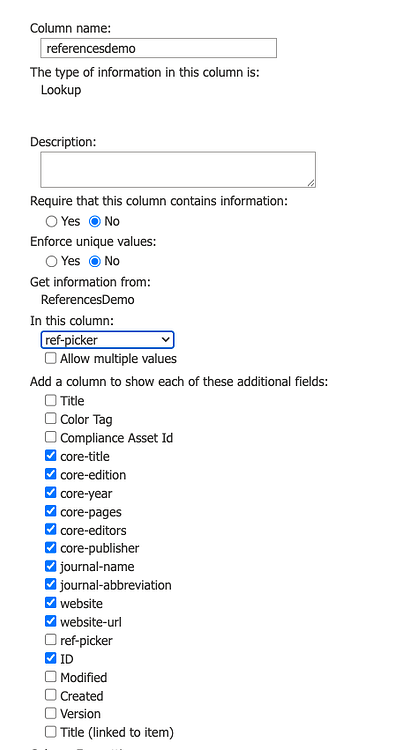
To display this data instantly on the form when a user selects an option in the lookup column, follow these steps:
-
Add a Common Text field or Text control corresponding to each additional column you want to display.
If you decide to go with common fields, you can disable them.
-
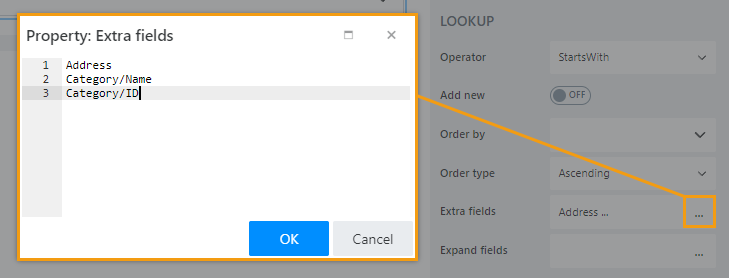
Define the internal field names of the data you want to retrieve from the source list. Do not use these names:
referencesdemo_x003a_core_x002d_
referencesdemo_x003a_core_x002d_3
These are names of the Additional columns you've selected in the field settings, you don't need them.
Go to the
ReferencesDemolist and get the correct internal names of the columns there. List names in the Extra fields property: -
Add code to populate the Common Text fields when the value of the Lookup field changes:
fd.spRendered(function() {
    fd.field('referencesdemo').ready(field => {
        field.$on('change', value => {
            //populate common field with extra column value
            fd.field('Text1').value = value.InetrnalNameExtraColumn
        });
    });
});
Replace InetrnalNameExtraColumn with the inetrnal name of the extra column.
Start with one column, if it works add others.