LookupDependent Extra Fields Not Refreshing

Greetings!

I have reviewed my own posts that relate to the subject of Lookup fields, looked again at your Extra Fields documentation, and searched against other community posts that had keywords such as “Extra Fields“ and ”LookupDependent”. I have also tried various tests and it seems I have failed to recall this simple task of getting extra fields to update on change of the lookup field itself. It seems obvious but I can’t quite reach the goal.

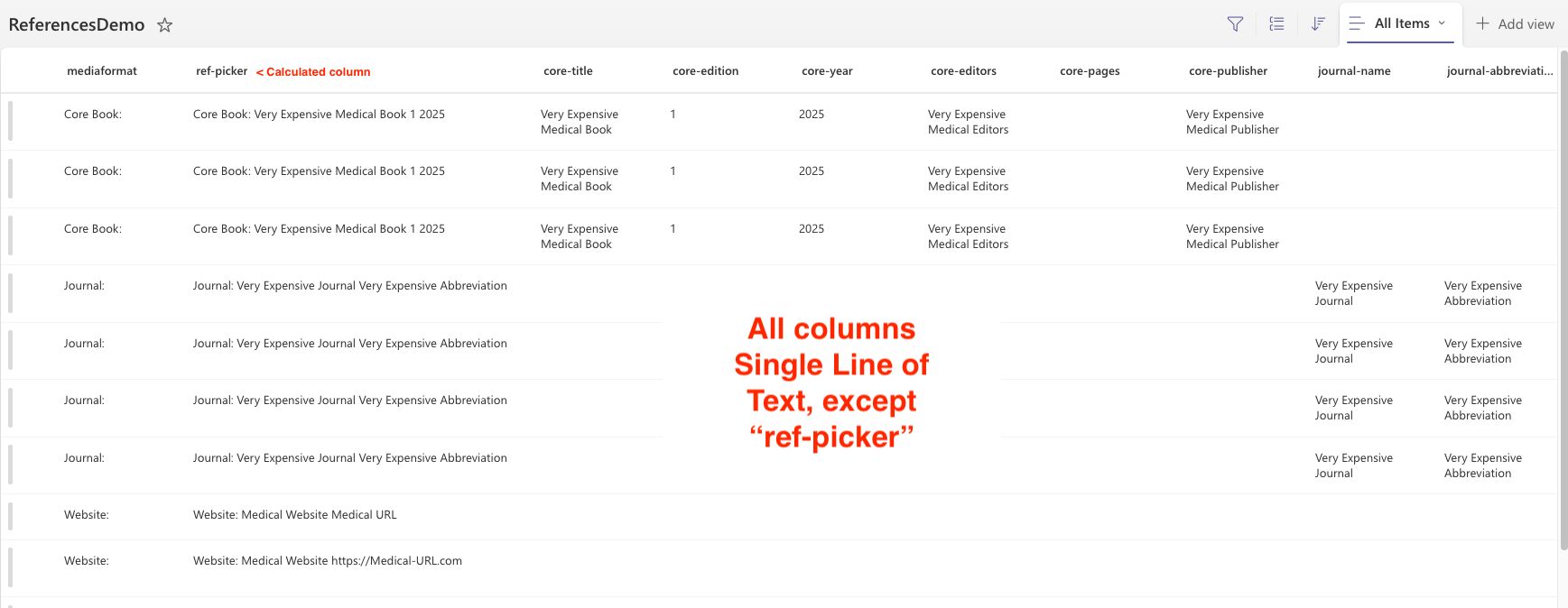
LIST 1: Main list with Lookup column ‘referencesdemo’ which references ReferencesDemo (Source/List 2)

LIST 2: Source list ReferencesDemo with several columns that all should be populated on change

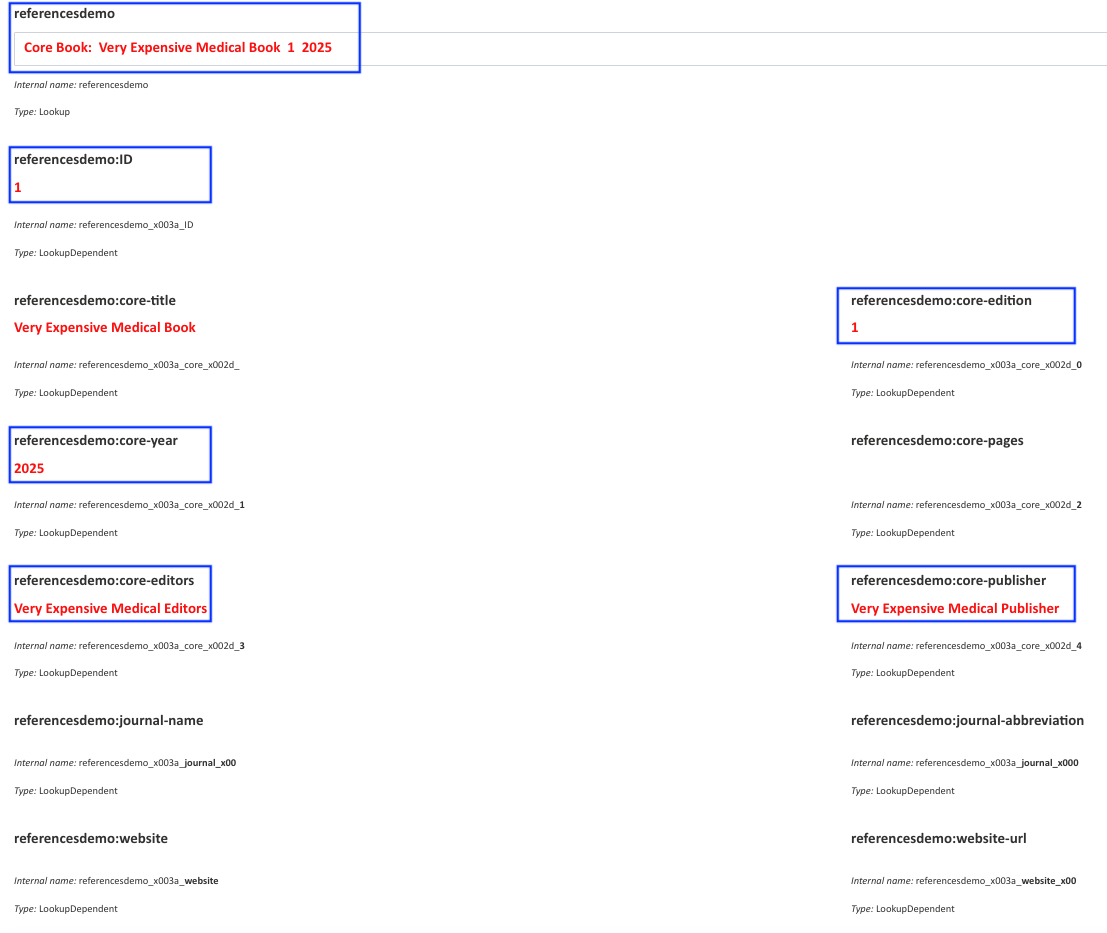
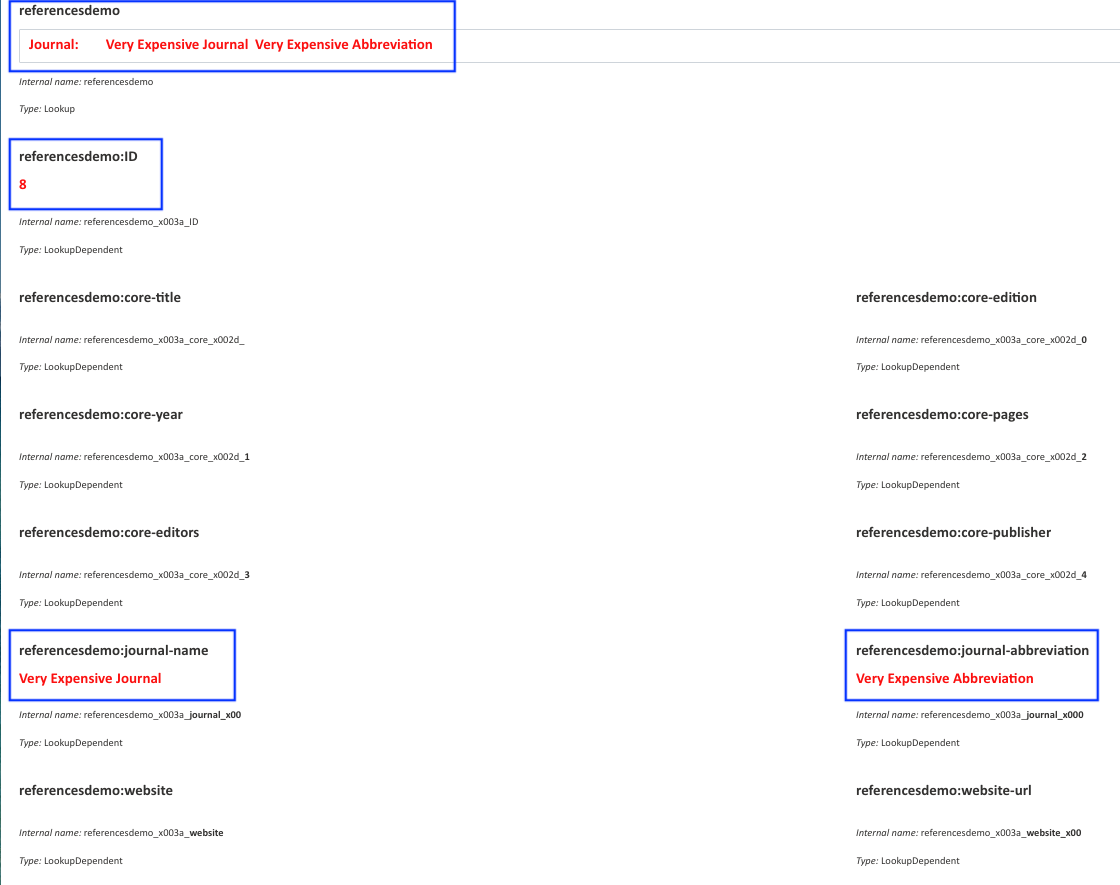
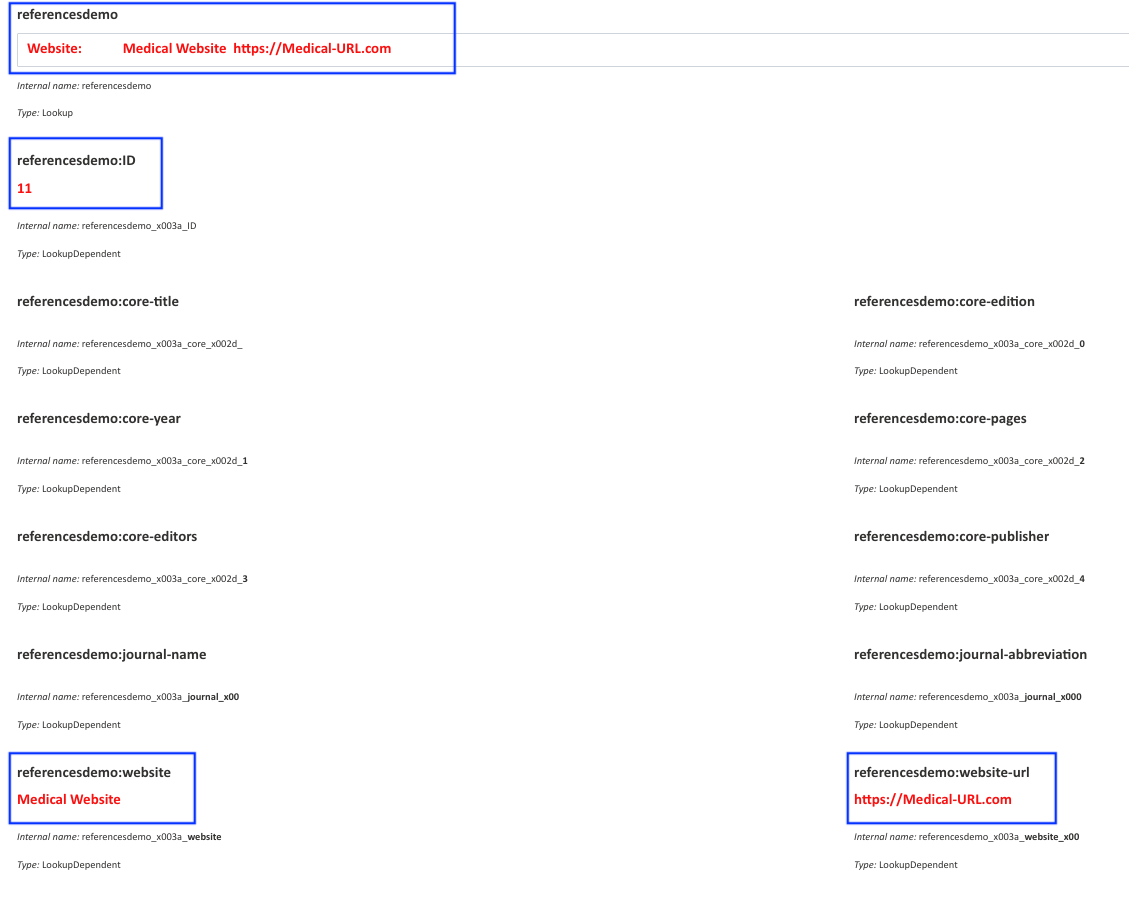
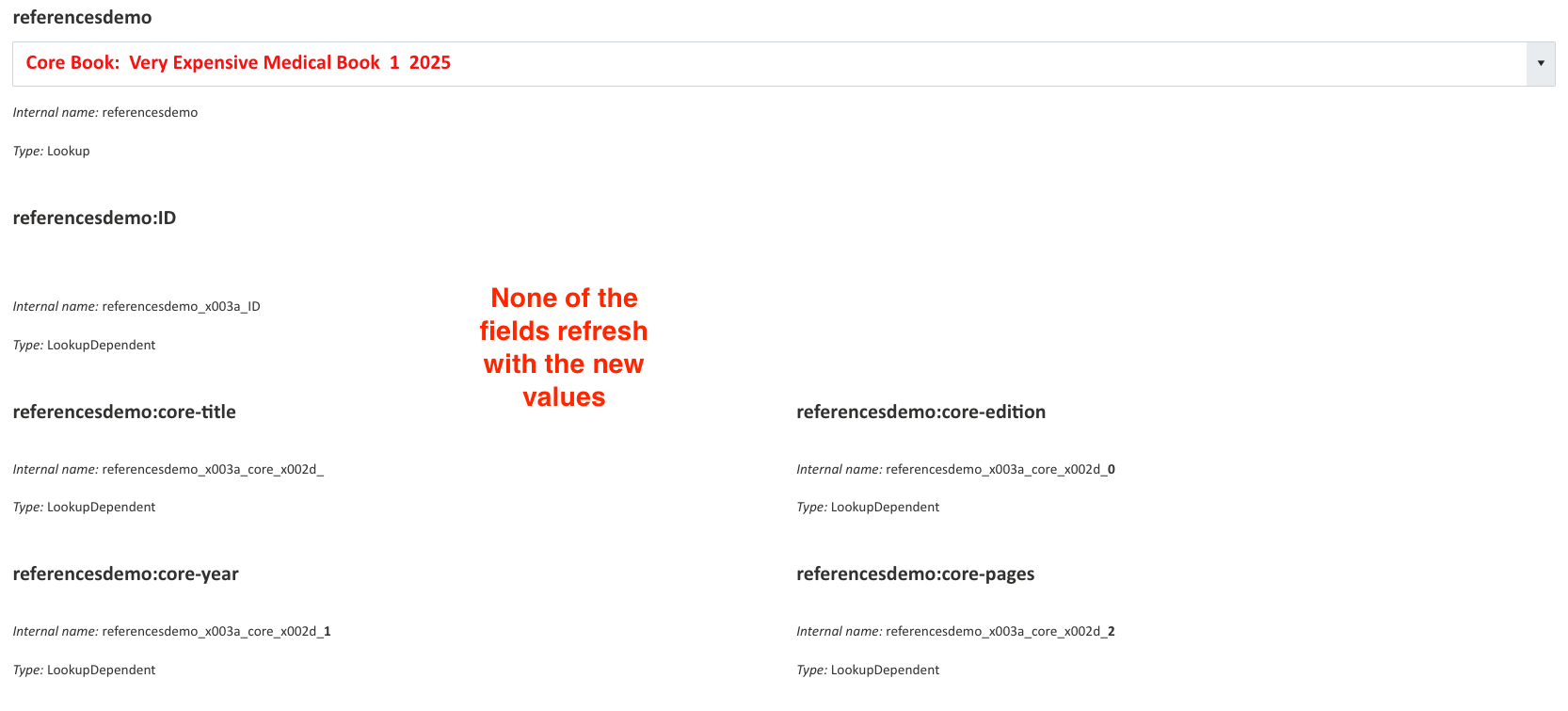
GOAL: (screen captures from three samples; for testing purposes, I have added text controls to show the internal name and type of each extra field)

User selects one of the Core Books:

User selects one of the Journals:

User selects one of the Websites:

CURRENT BEHAVIOR:

None of the extra fields change when ‘referencedemo’ field changes.

CODE ATTEMPTS: (there were many more but I am starting from scratch now)

//Ready 'referencesdemo' Lookup field > THIS WORKS

fd.spRendered(function() {

	fd.field('referencesdemo').ready(field => {

	alert('Your item is now ready for development.');

    });

});
//Trying to update extra fields when 'referencesdemo' Lookup field changes > DOES NOT WORK

fd.spRendered(function() {

fd.field('referencesdemo').ready(function() {

fd.field('referencesdemo').$on('change', function(value) {

//core-book

	fd.field('referencesdemo_x003a_core_x002d_').value = value.LookupValue;

	fd.field('referencesdemo_x003a_core_x002d_0').value = value.LookupValue;

	fd.field('referencesdemo_x003a_core_x002d_1').value = value.LookupValue;

	fd.field('referencesdemo_x003a_core_x002d_2').value = value.LookupValue;

	fd.field('referencesdemo_x003a_core_x002d_3').value = value.LookupValue;

	fd.field('referencesdemo_x003a_core_x002d_4').value = value.LookupValue;

//journals

	fd.field('referencesdemo_x003a_journal_x00').value = value.LookupValue;

	fd.field('referencesdemo_x003a_journal_x000').value = value.LookupValue;

//website

	fd.field('referencesdemo_x003a_website').value = value.LookupValue;

	fd.field('referencesdemo_x003a_website_x00').value = value.LookupValue;

//ID

	fd.field('referencesdemo_x003a_ID').value = value.LookupValue;

	});

    });

});

@Margo - your statement “Values of the additional columns will be displays only after the data is saved” in this post, and the link to more info when we “want to show this values instantly when user selects an option in a lookup dropdown”, I have also tried adding the extra fields but have had no luck. I will keep trying :slight_smile: but it occurs to me - are Extra Fields those which are built-in SharePoint/EntraID fields, or so they also support those fields we create in SP?

Hello @shedev,

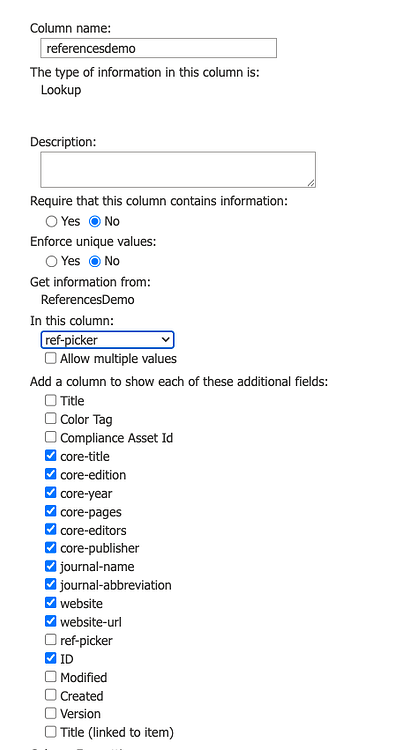
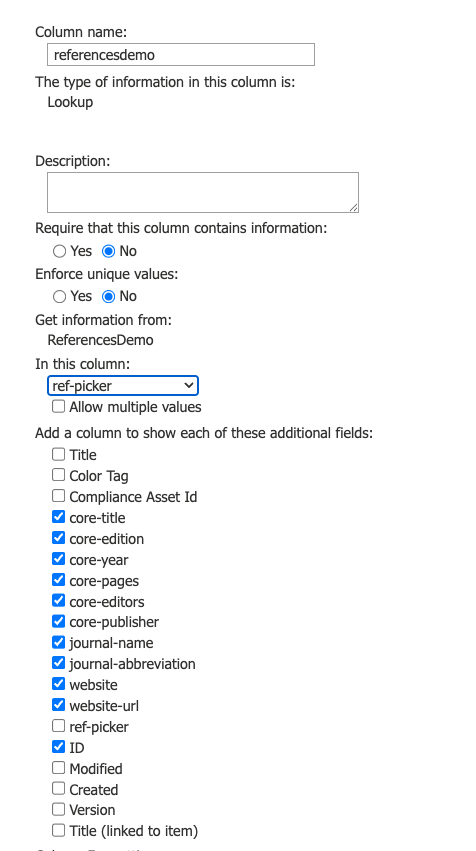
Additional fields selected for a lookup column will not automatically update when the lookup field value changes:

To display this data instantly on the form when a user selects an option in the lookup column, follow these steps:

  • Add a Common Text field or Text control corresponding to each additional column you want to display.

    If you decide to go with common fields, you can disable them.

  • Define the internal field names of the data you want to retrieve from the source list. Do not use these names:

    referencesdemo_x003a_core_x002d_
    referencesdemo_x003a_core_x002d_3
    

    These are names of the Additional columns you've selected in the field settings, you don't need them.

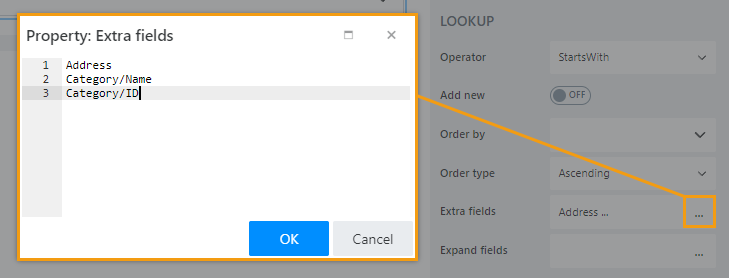
    Go to the ReferencesDemo list and get the correct internal names of the columns there. List names in the Extra fields property:

  • Add code to populate the Common Text fields when the value of the Lookup field changes:

    fd.spRendered(function() {
        fd.field('referencesdemo').ready(field => {
            field.$on('change', value => {
                //populate common field with extra column value
                fd.field('Text1').value = value.InetrnalNameExtraColumn
            });
        });
    });
    

    Replace InetrnalNameExtraColumn with the inetrnal name of the extra column.

Start with one column, if it works add others.

Thank you as always @Margo . DO you sometimes roll your eyes and shake your head with these questions? I am sorry because I know the answers largely exist somewhere already; the large volume of posts and finding the right search term sometimes defeat my best efforts. I hope you are well and I thank you so much for taking the time to spell out all of the details - sometimes for the nth time :smiling_face_with_three_hearts:

@shedev,

No, not really. :sweat_smile: It is okay to not understand something, and I'm here to explain. And when it comes to Lookups—it is pretty complex field and it trips me up sometimes too!

Have you managed to set it up?

@Margo - I got it figured out, yes. Thank you so much.I have some filtering to do and also some UI design work ahead, but the functionality is on target. Thank you as always. When it is looking clean, I will upload a screen capture here and mark as solved :slight_smile:
@Margo - I wanted to circle back to this to add some more information about how I got this to work for me. I also have a few questions about better ways to approach this entire process.

Extra Fields

First, I will share the Extra fields that I used in this case. You had recommended “List names in the Extra fields property” which was certainly something I hadn’t understood. I still get tripped up on the “Expand”, which I am not using right now but somehow get a feeling that I should :slight_smile:

So, thank you for that tip - it made a big difference!

Temporary Values

Another thing you suggested was “Add a Common Text field or Text control corresponding to each additional column you want to display.” I did this for all SharePoint fields in question and naturally, it worked as you said. It’s getting pretty bloated with so many fields and is why I think I am not exactly harnessing the lookup options to their fullest. In black text are the Extra (Additional) fields; I have named then with a “Saved Value” to help me keep everything in order while I build the form. In blue text are the Plumsail text fields, again keeping them blue to help me see what I am doing.

In the image below, the first of the three columns is where I am trying to perfect the code and functionality before I apply the same to columns 2 and 3. That’s why they don’t match right now.

Plumsail Editor View

SharePoint View

Current Workflow

  1. The user first selects a Primary Type (in Step #1: Core Book,Journal, Website, and UTD).
  2. There is show/hide code to only reveal accordion children that match the primary type, so Core Book type shows Core Book accordion child, etc.
  3. Each accordion has Extra fields + the Plumsail Common Text field or Text control fields.
  4. The user then has an opportunity to pick a reference from the lookup field (in Step #2).
  5. Step #2 uses a calculated field from the lookup list to help the user find the right listing because there may be books, journals, and websites that have the same name but different issues or volumes (e.g., Issue 1, Issue 2)
  6. Additional complexity is introduced because some of the refereference fields require user input. For example, a book is selected but it is the user’s responsibility to enter the page numbers that correspond with the work they are doing in the form.
  7. The user may pick up to three references of varying types, so that is why there is a Reference A, B, and C.
  8. The three reference columns all point to the same Lookup List; it holds all the Core Books, Journals, Websites, and UTD.

Change Handling

My concerns are many with this workflow as it is very labor-intense and I still need to figure out how to clear fields when a user comes back in and changes a Core Book to a Journal for example, leaving the Core Book Values still saved in the parent SharePoint list.

I am trying to only show saved fields when a value exists, and only show the temporary fields when using selecting a reference from Step #2. Even still, there are now artifacts from previously chosen references once saved before changing.

I have a sense that maybe I could leverage Expand here but perhaps not. This is a lot to read and take in but I wanted to provide meaningful feedback and express my thankfulness to you for all the help you’ve given me. Plus, if my long posts and screen capture make the difference for someone else, that would make me happy!

@shedev,

Expand field property is used for fields like Lookup and Person or Group, as its value is an object. Please find more information here:

And what exactly doesn't work?

You can clear fields with fd.field('Field1').clear(); when the field value changes. You can add any logic you need to.

@Margo - Admittedly, I haven’t labored a lot with Expanded fields but when I have tried, the drop down field doesn’t engage at all - it behaves like a read only or locked field no movement. So I think I need to spend more time to explore.

As for the clear fd.field('Field1').clear(); , yes, I have made that work for a few test fields but thought maybe there is a cleaner way to reveal these fields. I will update my progress again when I find a good flow. I appreciate you and thank you for responding.

I am still working through change handling for user-input fields that are not pre-filled by the Lookup list but I will share the basic of how this functionality was used to accomplish my goals:

  1. Auto-populate temporary fields to display values (I set the color as blue to help differentiate) while users actively select References in Step #2.
  2. Then, once the user saves the form and comes back to review their selections, the saved values appear (in black) as expected.

In this example above, the fields in blue are all Plumsail COMMON text fields and the fields in black are SharePoint Lookup list additional fields added to the Plumsail Form Designer. Plus, the Reference X (Step #2) calls out these and other columns in the “Extra fields” panel. Let’s break that down.

In SharePoint Child List (named References in this case)

Several columns with values in all - like a spreadsheet full of data which has been hidden here for security purposes.

ChildRefList

In SharePoint Parent List (name not shared for security purposes)

Several columns with values in all - like a spreadsheet full of data which has been hidden in this post for security purposes.

I have three Lookup fields that use the Child List for References (A, B, C). I will show “reference-a” plus additional fields in this example.

In Plumsail, the additional fields from SP (as shown above) are included in the extra fields panel. Some fields are not supported in Lookup fields in SharePoint, such as Choice fields, so I call them out later in Plumsail. I am not sure if I fully understand why but that’s how I have it configured currently.

In the Parent SP List Settings, this is a snippet of what those columns look like for SharePoint Parent columns and then how the Lookup columns appear extended from the Child.

This is an example of some of the JS for Ref A - there is a copious amount of code to get all three reference sections to perform correctly. And there are a lot of fields in SharePoint and in Plumsail to make everything work.

// REFERENCE A — load-safe, clear-safe mapper
fd.spRendered(function () {
  const lu = fd.field('reference_x002d_a');
  if (!lu) return;

  function populateFrom(value) {
    // Clear all temp fields first
    fd.field('txt-ref-a-id').value = '';
    fd.field('txt-core-title-a').value = '';
    fd.field('txt-core-edition-a').value = '';
    fd.field('txt-core-year-a').value = '';
    fd.field('txt-core-editors-a').value = '';
    fd.field('txt-core-publisher-a').value = '';
    fd.field('txt-journal-name-a').value = '';
    fd.field('txt-journal-abbreviation-a').value = '';
    fd.field('txt-website-a').value = '';
    fd.field('txt-website-url-a').value = '';
    fd.field('txt-utd-date-a').value = '';
    fd.field('txt-utd-editor-a').value = '';
    fd.field('txt-utd-place-a').value = '';
    fd.field('txt-utd-publisher-a').value = '';
    fd.field('txt-utd-website-a').value = '';

    if (!value) return; // done (cleared)

    // Populate when value exists (guard each property)
    fd.field('txt-ref-a-id').value              = value.ID ?? '';
    fd.field('txt-core-title-a').value          = value.core_x002d_title_x002d_a ?? '';
    fd.field('txt-core-edition-a').value        = value.core_x002d_edition_x002d_a ?? '';
    fd.field('txt-core-year-a').value           = value.core_x002d_year_x002d_a ?? '';
    fd.field('txt-core-editors-a').value        = value.core_x002d_editors_x002d_a ?? '';
    fd.field('txt-core-publisher-a').value      = value.core_x002d_publisher_x002d_a ?? '';
    fd.field('txt-journal-name-a').value        = value.journal_x002d_name_x002d_a ?? '';
    fd.field('txt-journal-abbreviation-a').value = value.journal_x002d_abbreviation ?? '';
    fd.field('txt-website-a').value             = value.website ?? '';
    fd.field('txt-website-url-a').value         = value.website_x002d_url ?? '';
    fd.field('txt-utd-date-a').value            = value.utd_x002d_date ?? '';
    fd.field('txt-utd-editor-a').value          = value.utd_x002d_editor ?? '';
    fd.field('txt-utd-place-a').value           = value.utd_x002d_place ?? '';
    fd.field('txt-utd-publisher-a').value       = value.utd_x002d_publisher ?? '';
    fd.field('txt-utd-website-a').value         = value.utd_x002d_website ?? '';
  }

  // Wire change safely
  lu.ready(field => {
    field.$on('change', populateFrom);

    // Initial populate (if the lookup already has a value on load)
    try { populateFrom(field.value); } catch(_) {}
  });
});

Change Handling

Fields that are not auto-populated from the Child List Lookup column have extra fields to help with temporary values, then changing those values once saved (if a change occurs). This is probably more difficult that the rest of the operations. For example, if the user picks a specific type for Ref A (Core Book, Journal, Website); in this example, let’s say the user selects Core Book, inputs non-LU-field values for Core Pages A, then saves the form. We know that value for Core Pages A is set. If the user edits the form again, this time changing the type (say from Core Book to Journal), that previously saved Core Pages A value still remains in the list causing now stale values to remain. This is complex in my opinion and not a fun part of the build because, you can see below, it takes about 4 columns to support a single value in this workflow.

Again, here is a very small snippet of some of the code that makes this work. I relied very heavily on MS Copilot to figure this out and it still is pretty detailed.

// =====================================
// Call it three times (A, B, C)
// =====================================

// ---------- A Call ----------
wireReferenceSlot({
  mediaField: 'pri_x002d_ref_x002d_a',
  lookupField: 'reference_x002d_a',
  sourceMediaColumn: 'primarytype',
  accordionControl: 'RefAccordionA',
  primaryTypeLabelCtrl: 'primarytypeswitchera',

  // TEMP groups (existing)
  groups: {
    'Core Book': ['txt-core-title-a','txt-core-edition-a','txt-core-year-a','txt-core-editors-a','txt-core-publisher-a','txt-core-pages-a'],
    'Journal':   ['txt-journal-name-a','txt-journal-abbreviation-a','txt-journal-article-a','txt-journal-url-a','txt-journal-volume-a','txt-journal-issue-a','txt-journal-year-a','txt-journal-pages-a','txt-journal-article-author-a','txt-journal-doi-a'],
    'Website':   ['txt-website-a','txt-website-url-a','txt-website-title-a','txt-website-author-a','txt-website-title-url-a','txt-website-publish-date-a','txt-website-publish-update-a'],
    'Up To Date':['txt-utd-article-a','txt-utd-author-a','txt-utd-editor-a','txt-utd-date-a','txt-utd-website-a','txt-utd-place-a','txt-utd-publisher-a']
  },

  // NEW: SAVED groups (backend fields shown after save for each type)
  savedGroups: {
    'Core Book': [
      'reference_x002d_a_x003a_core_x00',
      'reference_x002d_a_x003a_core_x003',
      'reference_x002d_a_x003a_core_x000',
      'sp_x002d_core_x002d_pages_x002d_',
      'reference_x002d_a_x003a_core_x001',
      'reference_x002d_a_x003a_core_x002'
    ],
    'Journal': [
      'reference_x002d_a_x003a_journal_',
      'reference_x002d_a_x003a_journal_0',
      'sp_x002d_journal_x002d_article_x',
      'sp_x002d_journal_x002d_url_x002d',
      'sp_x002d_journal_x002d_volume_x0',
      'sp_x002d_journal_x002d_issue_x00',
      'sp_x002d_journal_x002d_year_x002',
      'sp_x002d_journal_x002d_pages_x00',
      'sp_x002d_journal_x002d_article_x0',
      'sp_x002d_journal_x002d_doi_x002d'
    ],
    'Website': [
      'reference_x002d_a_x003a_website',
      'reference_x002d_a_x003a_website_',
      'sp_x002d_website_x002d_title_x00',
      'sp_x002d_website_x002d_author_x0',
      'sp_x002d_website_x002d_title_x000',
      'sp_x002d_website_x002d_publish_x',
      'sp_x002d_website_x002d_publish_x3'
    ],
    'Up To Date': [
      'sp_x002d_utd_x002d_author_x002d_',
      'sp_x002d_utd_x002d_article_x002d',
      'reference_x002d_a_x003a_utd_x0023',
      'reference_x002d_a_x003a_utd_x0020',
      'reference_x002d_a_x003a_utd_x0022',
      'reference_x002d_a_x003a_utd_x0021',
      'reference_x002d_a_x003a_utd_x002'
    ]
  },

  // NEW: Always hide (backend helpers/readonly controls you said should never show)
  alwaysHide: [
    'roPagesTxtPSA','roCoreBookPages',
    'roJournalArticleTxtPSA','roJournalArticleA',
    'roJournalURLTxtPSA','roJournalURLA',
    'roJournalVolumeA','roJournalIssueA',
    'reference_x002d_a_x003a_primaryt'
  ]
});

This is a block I have used in the past and still lean on here.

//>>>>>>>>>>>>>> Update SharePoint Core Book values when temp text values change txt-core-pages-a
fd.spRendered(function() {
    fd.field('txt-core-pages-a').$on('change', function(value) {
        fd.control('roPagesTxtPSA').text = fd.field('txt-core-pages-a').value;
        fd.field('roCoreBookPages').value = fd.field('txt-core-pages-a').value;
        fd.field('sp_x002d_core_x002d_pages_x002d_').value = fd.control('roPagesTxtPSA').text;

    });
    
});
//

I hope some of this helps others to have a few bread crumbs on their own journey. When I say I relied on Copilot heavily, here is what I did. I built the site, styling and coding in ways I have done for several years. Once I was at a place where I was happy with base functionality, I asked MS365 Copilot to review my JavaScript document. From there, it was a mad exercise trying to redirect the output when I knew it was wrong, and also to reframe my prompts to ask questions in more meaningful ways. The bottom line where AI is concerned is this: does it work? It can. Is it accurate? Not exactly? Does it intuit what you already know about Plumsail and its API? Not reliably. Can it offer new ways to refine code? Almost always? Do I wish it could have greater insights into my use cases and understand what has already been done? Yes. Meaning - I can’t just tell MS365 Copilot to browse my site URL and tell me about what it would improve; I tried :slight_smile: , but I had to explicitly tell it my requirements, column names, workflow, etc. What I haven’t done yet is create an agent to set base expectations but I know I will need to eventually. I end up telling and retelling the prompt things it “should” already have logged in chats.

Good luck out there!