On Change of a lookup field - works on load but not on subsequent change of the field

Hi

I have a lookup column for which I am updating and setting a default value when the form renders. This action causes the on change of the look up field to fire and the value is displayed correctly in the popup.

However when I change the values in the lookup dropdown I get error displayed "[object Object]" on subsequent changes. Any ideas? I have tried opening the form in Incognito window however the same result.

fd.field('Period').$on('change', function() {
alert('test1');
alert(fd.field('Period').value);
alert('test12);
});

Hello @SamirPateluk ,

[object Object] shows you the alert, because you are returning entire element (instance) (for example). Try:

fd.field('Period').$on('change', function() {
console.log('test1');
console.log(fd.field('Period').value);
console.log('test12);
});

Eventually:

fd.field('Period').$on('change', function(value) {
console.log(value);
});

Dear @Samir,
If it's a Lookup field, you can try the following:

fd.field('Period').$on('change', function(value) {
    console.log(value.LookupId);
    console.log(value.LookupValue);
});

And if it's multi-select, it will return an array which you can access via a number:

fd.field('Period').$on('change', function(value) {
    console.log(value[0].LookupId);
    console.log(value[0].LookupValue);
});

Or you can iterate over the array - Array.prototype.forEach() - JavaScript | MDN

1 Like

This worked thank you.

1 Like

For some reason On form load the list control is not filtering. Scenario is we have a list control and period look up field.

As mentioned once form opens and period is changed the data is filtered as expected. However on the form load we are setting a default value for the period and need to ensure the list is filtered based on the value.

var dt = fd.control('SubmittedTimesheets');

fd.field('Period').$on('change', function(value) {
    filterDT(value);
    });

function filterDT(value) {
    dt.filter = "<Eq><FieldRef Name='Period'/><Value Type='Lookup' LookupId='True'>" + value.LookupValue + "</Value></Eq>";
    dt.refresh();
}

Period lookup ready..

       fd.field('Period').ready(function(field) {
           var currentDate = new Date();
           currentDate.setDate(currentDate.getDate() - 2);
            pnp.sp.web.lists.getByTitle('Timesheet Submission Periods').items.select('ID').top(2).orderBy("Deadline", true).filter("Deadline ge '" + currentDate.toISOString() + "'").get().then(function(items) {
            fd.field('Period').value = items[0].ID;
            filterDT(fd.field('Period').value);
            });
       });

Any ideas? Thanks in advance.

Dear @SamirPateluk,
You have the answer right in your code. In filterDT() function you are getting value.LookupValue which is available if you set the value manually, but it's not available if you set the value with just ID on form load.

You can add another filter condition after setting the field value on load, and keep the filterDT() function for when it's changed by the user.

Like so:

fd.field('Period').ready(function(field) {
           var currentDate = new Date();
           currentDate.setDate(currentDate.getDate() - 2);
            pnp.sp.web.lists.getByTitle('Timesheet Submission Periods').items.select('ID').top(2).orderBy("Deadline", true).filter("Deadline ge '" + currentDate.toISOString() + "'").get().then(function(items) {
            fd.field('Period').value = items[0].ID;
            dt.filter = "<Eq><FieldRef Name='Period'/><Value Type='Lookup' LookupId='True'>" + items[0].ID + "</Value></Eq>";
            dt.refresh();
            });
});

Hi, I had tried that approach too but it's not working. Could it be that the controlSubmittedTimesheets isn't avaiable when the field Project ready function runs?

Dear @SamirPateluk,
Absolutely possible, add another ready wrap to it:

fd.field('Period').ready(function(field) {
    var currentDate = new Date();
    currentDate.setDate(currentDate.getDate() - 2);
    pnp.sp.web.lists.getByTitle('Timesheet Submission Periods').items.select('ID').top(2).orderBy("Deadline", true).filter("Deadline ge '" + currentDate.toISOString() + "'").get().then(function(items) {
        fd.field('Period').value = items[0].ID;
        let dt = fd.control('SubmittedTimesheets');
        dt.ready(() => {
            dt.filter = "<Eq><FieldRef Name='Period'/><Value Type='Lookup' LookupId='True'>" + items[0].ID + "</Value></Eq>";
            dt.refresh();
        });
    });
});
1 Like

I am tearing my hair out.. Can't see why this isn't working...

On change filter is as below and it's filtering against value
dt.filter = "" + value.LookupValue + ""

On load its filtering using ID
dt.filter = "" + items[0].ID + ""

Additionally as the field is changed on load the "Change" of period is also called and should really filter. Once form is loaded and subsequent changes to period field all works as expected!

Dear @SamirPateluk,
Does it still not work? If so, try to debug with console logs, compare what you get on load:

fd.field('Period').ready(function(field) {
    var currentDate = new Date();
    currentDate.setDate(currentDate.getDate() - 2);
    pnp.sp.web.lists.getByTitle('Timesheet Submission Periods').items.select('ID').top(2).orderBy("Deadline", true).filter("Deadline ge '" + currentDate.toISOString() + "'").get().then(function(items) {
        fd.field('Period').value = items[0].ID;
        let dt = fd.control('SubmittedTimesheets');
        dt.ready(() => {
            dt.filter = "<Eq><FieldRef Name='Period'/><Value Type='Lookup' LookupId='True'>" + items[0].ID + "</Value></Eq>";
            console.log(dt.filter);
            dt.refresh();
        });
    });
});

And after:

function filterDT(value) {
    dt.filter = "<Eq><FieldRef Name='Period'/><Value Type='Lookup' LookupId='True'>" + value.LookupValue + "</Value></Eq>";
    console.log(dt.filter);
    dt.refresh();
}

If one doesn't work and the other one does work, there should be some difference between the two - and you need to make sure the first one matches the second one.

Please, post screenshots from console here if you can't figure it out!

Apologies for the delay. I have updated the query to use ID and it works.

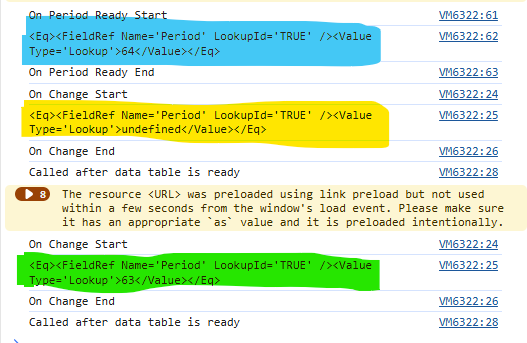
attached the log. As mentioned, On render once 'Period' is loaded we are setting the value of the field. When the form loads its setting the filter value highlighted in blue (If I Disable the On-Change option the filtering on load works as expected).

As we are setting the value onload for the 'Period', it also triggers the 'Period' on change function, on load of the form and in that case the value seems to be 'Undefined' - highlighted in Yellow.

On subsequent changes, the data is refreshed as expected - highlighted in green.

Dear @SamirPateluk,
So is everything working as expected now? Or is something still wrong?

Nikita - it still isn’t working as expected. Once the field loads, I am setting the default value of period, i.e. triggering the “on change”. The triggering of on change seems to send the query as highlighted in yellow however the data isn’t refreshed in the table as expected.

Subsequent triggering of On change works as expected (highlighted in green)
Dear @SamirPateluk,

Then, include a check with if condition inside of your function, that if the value is just an int, use it instead:

function filterDT(value) {  
    if (typeof value === 'number'){    
        dt.filter = "" + value + "";     
    }  
    else if(value && value.LookupValue){    
        dt.filter = "" + value.LookupValue + "";  
    }  
    else{    
        dt.filter = "";  
    }
    dt.refresh();
}

Apologies for the delay, this worked. Thank you.