TWendt
July 16, 2025, 4:32am
1
Hi,
I used forms in German and Englisch. But when my colleagues in the USA used the form, the German form was displayed. I used your arcticle SharePoint forms for alternative languages — Plumsail SharePoint Forms Documentation . Please help.
Best wishes
Margo
July 16, 2025, 7:56am
2
Hello @TWendt ,
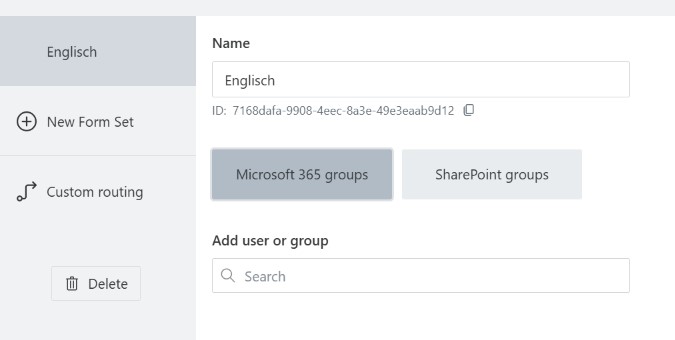
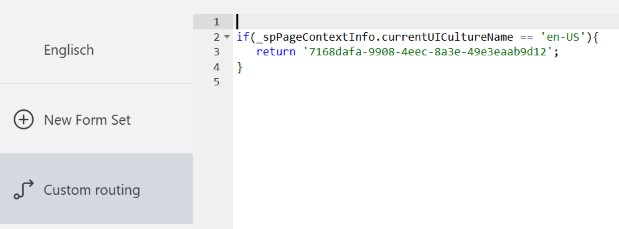
Please share the routing settings and the code you are using in routing.
TWendt
July 16, 2025, 9:03am
3
Hi,
here are the screenshots.
Best wishes
Margo
July 17, 2025, 5:48am
4
@TWendt ,
Please try updating the condition like so and test the form routing:
_spPageContextInfo.currentUICultureName.includes('en');
TWendt
July 17, 2025, 6:18am
5
Hi Margo,
I modify the condition. But the problem persists.
if(_spPageContextInfo.currentUICultureName.includes('en')){
Best wishes
Margo
July 17, 2025, 8:13am
6
@TWendt ,
What's their site culture? Could you update the code like so and share the screenshot of the alert box:
if(_spPageContextInfo.currentUICultureName.includes('en')){
    alert(_spPageContextInfo.currentUICultureName);
    return '7168dafa-9908-4eec-8a3e-49e3eaab9d12';
}
TWendt
July 17, 2025, 8:42am
7
Hi again,
there is no alert box displayed. I believe the script will not executed. But the site is displayed in English.
Best wishes
StepanS
July 17, 2025, 9:32am
8
Hello @TWendt ,
I hope my message is NOT unwanted, but I use the same approach as you described, but I use "strict equality ", but this should not be a problem:
if (_spPageContextInfo.currentUICultureName === "fr-FR") {
  return "xxxxxxx--92fa-a65f042b4814"; // French
}
if (_spPageContextInfo.currentUICultureName === "de-DE") {
  return "xxxxxxx-936-c5b128f125ce"; // German
}
if (_spPageContextInfo.currentUICultureName === "cs-CZ") {
  return "xxxxxx-49e7-b995-981bce1317c5"; // Czech
}
Check the site language settings:
{yourTenantAndSite}/_layouts/15/muisetng.aspx
I hope it will help you
Margo
July 17, 2025, 10:06am
9
@TWendt ,
This is my bad, the alert must be outside of the condition. If the alert is not executed, this means that it is not met. Try it like so:
alert(_spPageContextInfo.currentUICultureName);
if(_spPageContextInfo.currentUICultureName.includes('en')){
     return '7168dafa-9908-4eec-8a3e-49e3eaab9d12';
}
TWendt
July 17, 2025, 10:59am
10
Hi Margo,
Best wishes
Margo
July 17, 2025, 11:26am
11
@TWendt ,
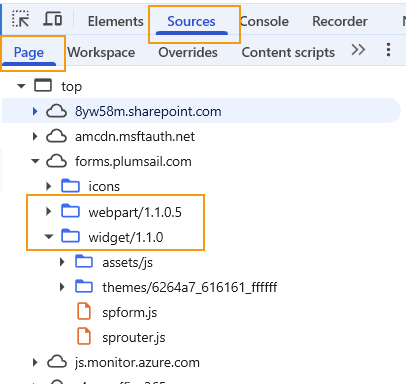
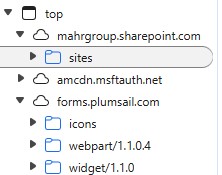
Please check the version of the widget and webpart this form is using. open developer tools(F12) >> Source >> Page >> forms.plumsail.com . Please share the screenshot.
Margo
July 18, 2025, 7:03am
13
@TWendt ,
You need to update the app package to the latest version, but I don't think it is the issue.
The code in custom routing must execute in any case. Do you have content types enabled for this list?
TWendt
July 21, 2025, 9:41am
14
Hi,
yes content types are enabled. How can I update the package?
Best wishes
Margo
July 22, 2025, 7:15am
15
@TWendt ,
Do you have form sets in all content types? Is the custom routing the same for all?
To update the app package, install it from the Microsoft AppSource and enable it for all sites within your organization.
TWendt
July 28, 2025, 4:58am
16
Hi Margo,
Margo
July 28, 2025, 8:39am
17
@TWendt ,
I believe there might be something wrong with content type set up.
Is it possible to provide us temporary access to your tenant to test the form? If not, please record a video of opening the form for all content types and the default form set. Please open the form in full screen and include the address bar in the video.
Please email us at support@plumsail.com to continue the conversation