Here is an example of how to change the + Add new record button label:
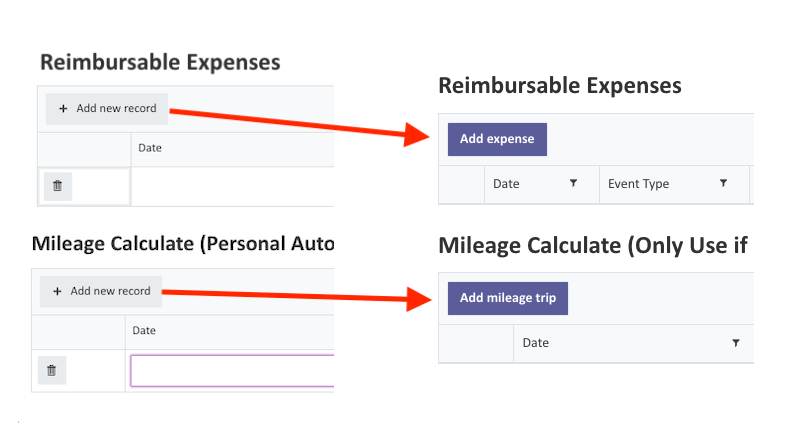
//Data Table Button Rename
fd.spRendered(function () {

  function renameAddRowButton(tableControlName, newCaption) {
    var ctrl = fd.control(tableControlName);
    if (!ctrl || !ctrl.$el) return;

    function apply() {
      // Look only inside THIS Data Table's DOM
      var $root = $(ctrl.$el);

      // Find a button-like element with the exact caption
      $root.find('button, a, .btn, [role="button"]').filter(function () {
        return ($(this).text() || '').trim() === 'Add new record';
      }).each(function () {
        $(this).text(newCaption);
      });
    }

    // Apply now…
    apply();

    // …and re-apply after changes that can cause redraws
    ctrl.$on('change', function () {
      // next tick gives the grid time to redraw
      setTimeout(apply, 0);
    });
  }

  // Your two tables:
  renameAddRowButton('ExpenseTable', 'Add expense');
  renameAddRowButton('MileageTable', 'Add mileage trip');
});
Updating CSS
/* "Add..." Expense & Mileage Button work */
.k-button.k-button-icontext.k-grid-add {
    background-color: #5b5d9b !important;
    color: white !important;
    font-weight: bold !important;
}