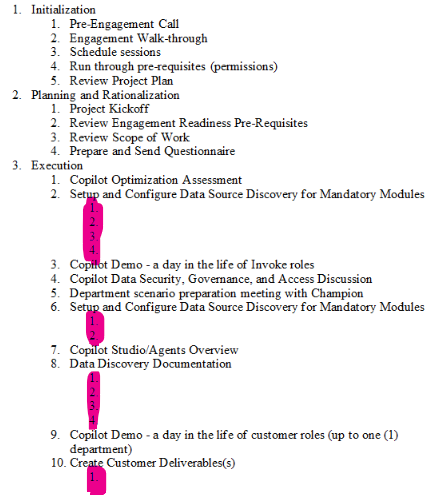
I am attempting to create a multi-level list in the classic mode and have mostly sorted out my issues with the JSON and tokens to get to the result I'm looking for. However, on my level 3 items in my multi-level list, sometimes there are blank values or null rows in the list. I used the "hide-block-if(value==null) capability and have successfully gotten the blank rows to disappear, however, now that they are gone, the level 3 rows that actually have data are not displaying the text, only the # in the list. Please help and see my JSON, Token and the sample output below.
Token in my word DOCX doc:
- {{cSCO.sPhase_L1}}
- {{cSCO.csI_L2.sScopeItem}}
- {{cSCO.csI_L2.cTI_L3.sTaskItem}:hide-block-if(value==null)}
- {{cSCO.csI_L2.sScopeItem}}
JSON Code I am using:
{
  "cRS": [
    {
      "PrjRole": "Project Management",
      "ResRole": "Project Manager",
      "HrRate": "$215.00",
      "HRs": "10",
      "LTotal": "$2,150.00"
    },
    {
      "PrjRole": "Technical Oversight",
      "ResRole": "Principal Consultant",
      "HrRate": "$250.00",
      "HRs": "10",
      "LTotal": "$2,500.00"
    },
    {
      "PrjRole": "Delivery Consultant",
      "ResRole": "Principal Consultant",
      "HrRate": "$250.00",
      "HRs": "100",
      "LTotal": "$25,000.00"
    }
  ],
  "cFV": [
    {
      "FundSrc": "Microsoft ECIF",
      "FundAmt": "$10,000.00"
    }
  ],
  "cSCR": [
    {
      "sSucCrit": "Success Criteria 1"
    },
    {
      "sSucCrit": "Success Criteria 2"
    },
    {
      "sSucCrit": "Success Criteria 3"
    }
  ],
  "cSCO": [
    {
      "sPhase_L1": "Initialization",
      "csI_L2": [
        { "sScopeItem": "Pre-Engagement Call" },
        { "sScopeItem": "Engagement Walk-through" },
        { "sScopeItem": "Schedule sessions" },
        { "sScopeItem": "Run through pre-requisites (permissions)" },
        { "sScopeItem": "Review Project Plan" }
      ]
    },
    {
      "sPhase_L1": "Planning and Rationalization",
      "csI_L2": [
        { "sScopeItem": "Project Kickoff" },
        { "sScopeItem": "Review Engagement Readiness Pre-Requisites" },
        { "sScopeItem": "Review Scope of Work" },
        { "sScopeItem": "Prepare and Send Questionnaire" }
      ]
    },
    {
      "sPhase_L1": "Execution",
      "csI_L2": [
        { "sScopeItem": "Copilot Optimization Assessment" },
        {
          "sScopeItem": "Setup and Configure Data Source Discovery for Mandatory Modules",
          "cTI_L3": [
            { "sTaskItem": "Gen AI" },
            { "sTaskItem": "Exchange Online" },
            { "sTaskItem": "SharePoint Online" },
            { "sTaskItem": "Microsoft Teams" }
          ]
        },
        { "sScopeItem": "Copilot Demo - a day in the life of Invoke roles" },
        { "sScopeItem": "Copilot Data Security, Governance, and Access Discussion" },
        { "sScopeItem": "Department scenario preparation meeting with Champion" },
        {
          "sScopeItem": "Setup and Configure Data Source Discovery for Mandatory Modules",
          "cTI_L3": [
            { "sTaskItem": "Monitor Data Discovery Collection" },
            { "sTaskItem": "Review actions and report, if necessary" }
          ]
        },
        { "sScopeItem": "Copilot Studio/Agents Overview" },
        {
          "sScopeItem": "Data Discovery Documentation",
          "cTI_L3": [
            { "sTaskItem": "Exchange Online" },
            { "sTaskItem": "SharePoint Online" },
            { "sTaskItem": "Teams" },
            { "sTaskItem": "Gen AI" }
          ]
        },
        { "sScopeItem": "Copilot Demo - a day in the life of customer roles (up to one (1) department)" },
        {
          "sScopeItem": "Create Customer Deliverables(s)",
          "cTI_L3": [
            { "sTaskItem": "Findings and Recommendations – Data Risk Assessment" },
            { "sTaskItem": "Findings and Recommendations – Copilot Scenarios" },
            { "sTaskItem": "Technical & Business Overview" }
          ]
        }
      ]
    },
    {
      "sPhase_L1": "Closeout",
      "csI_L2": [
        { "sScopeItem": "Final Review & Next Steps / Closeout" },
        { "sScopeItem": "Engagement Decommissioning" }
      ]
    }
  ],
  "sCName": "Contoso's Inc",
  "dPDate": "5/29/2025",
  "sEngNm": "Azure AD B2C",
  "sDelForm": "Traditional",
  "sDelAllo": "Full-Day",
  "nWeeks": 20,
  "sCustSit": "I cannot generate SOW Automatically from Estimation App",
  "sCustNeed": "I cannot generate SOW Automatically from Estimation App",
  "sPropSol": "I cannot generate SOW Automatically from Estimation App",
  "sTotTMCost": "$29,650.00",
  "sTotCost": "$28,650.00"
}
Screen Shot of Sample Output from Test: