Hi,
I succeeded to modify the options of a dropdown control by using a custom template.
Looks (almost) good:
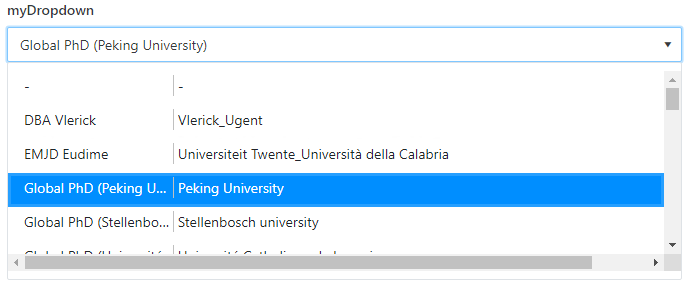
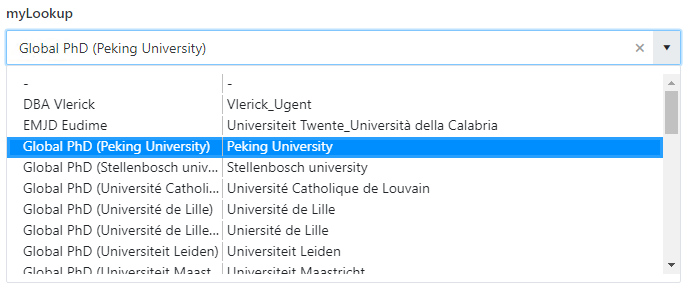
but the same template applied to a SharePoint lookup control looks (subjective) "better":
In the templateof the Plumsail form dropdown, I added some styling to the option element, i.e.
        var template = '';
        template += '<div style="white-space:nowrap;">';
        template += '<span style="'
        template += 'display: inline-block;'
        template += 'width:150px;'
        template += 'overflow: hidden;'
        template += 'white-space:nowrap;'
        template += 'text-overflow:ellipsis;'
        template += 'border-right: 1px solid silver;'
        template += '">'
        template += '#: data # '
        template += '</span> ';

        template += '<span style="'
        template += 'display: inline-block;'
        template += 'width:550px;'
        template += 'overflow: hidden;'
        template += 'white-space:nowrap;'
        template += 'text-overflow:ellipsis;'
        template += '">'
        template += '#: myItems.find(item => item[myColumnName] == data)[myColumnNameExtra] # '
        template += '</span> ';

        template += '</div>';

        fd.field(fieldName).widgetOptions = {
            template: template
        }
However, I can not address the "surrounding" element of the option.
So I wonder: what class is used for the different options in a dropdown?
Maybe I can overrule this class definition to have the same look&feel as for a SharePoint lookup field
grtz
bartplessers