Hello,
I have a simple wizard and I am trying to figure out a way to achieve the following:
User fills in data
When all the required fields in the tab are complete, show a checkmark on tab
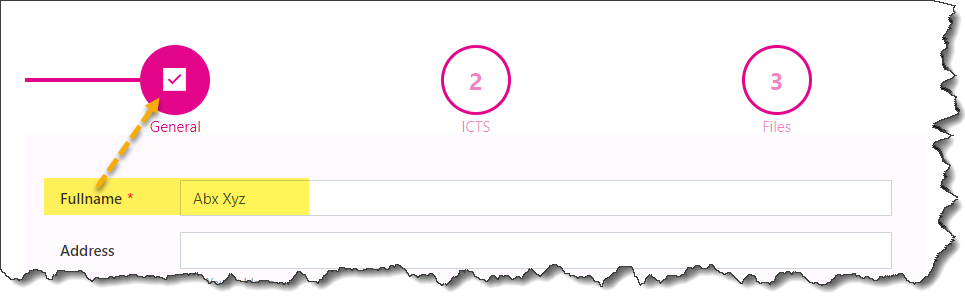
Example of what I want to achieve:
Here Fullname is required, it has been added without errors - then when I click on tab2, tab1 will automatically be converted to the icon.
Thank you for the reply.
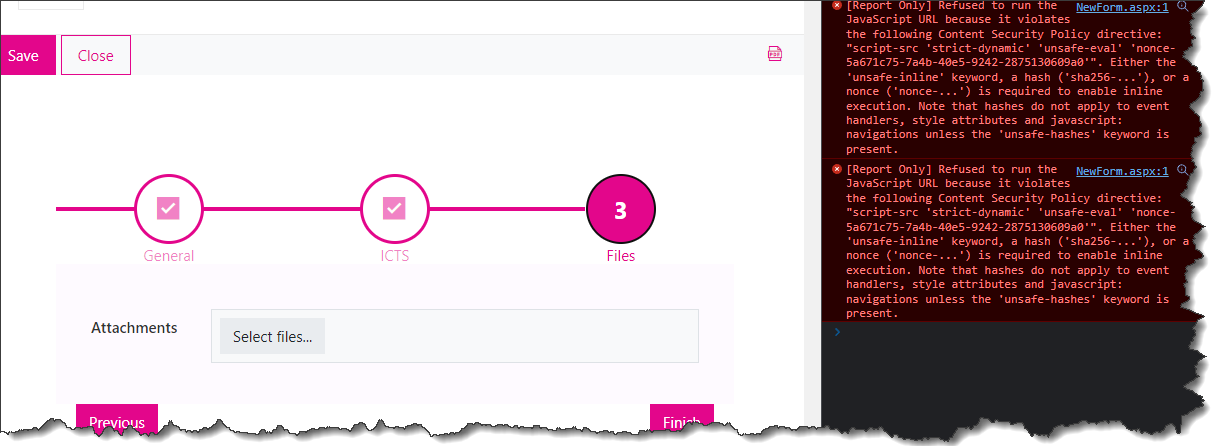
This works well when you are following the steps from say 1 to 3. If users were to fill the form in random order, how can we achieve the same as above? Because now, clicking on 3 after 1, gives me a checkmark on 2 where as I have not edited the fields there at all.
Also another "problem":
When I use fd.container('Wizard1').widget.activateAll() the console gets full of errors as follow:
Dear @asmita_adh,
The JavaScript to check all fields would be quite a bit more complex - the code I've posted above relies on the Wizard's functionality to self-check required fields, you normally cannot progress to Step 3, if you didn't complete all the required fields in Step 2, etc.
If the fields are not required, and you still want to check them before adding the checkmark, you'll need to manually check each field in each step.
Is there a dynamic way to read all fields in a tab? Something like, fd.container('Wizard1').widget.tabs[0].fields ?
Or a way to validate fields in the tab?
Also, what about the errors in the console? Is that a normal behavior?
Dear @asmita_adh,
The fields are automatically validated when you switch to the next step.
Not sure what causes the errors, might be specific to your form or JavaScript, as I am unable to reproduce the issue. If it doesn't impact the functionality - shouldn't be a problem.
As for accessing fields under a certain step, that is possible, you can access them like this:
fd.rendered(function () {
    //all fields on the form
    const fields = fd.fields();

    //update icons on load
    var wizard = fd.container('Wizard1');
    updateIcons(wizard.widget.activeTabIndex);

    //detect change and update icons
    fd.container('Wizard1').widget.$on('on-change', function(prevIndex, newIndex) {
        updateIcons(newIndex);
    });

    function updateIcons(index){
        var icons = [];
        for(var i = 0; i < index; i++){
          var complete = true;
          for(var y = 0; y < fields.length; y++){
              //loop through all fields looking for descendats of specific tabs
              if(isDescendant(fd.container('Wizard1').widget.tabs[i].$el, fields[y].$el)){
                if(!fields[y].value){
                  complete = false;
                }
              }
            }
          if(complete){
            icons[i] = 'BoxCheckmarkSolid';
          }
          else{
            icons[i] = 'Error';
          }
        }
        fd.container('Wizard1').icons = icons;
    }
});

// Check if `child` is a descendant of `parent`
const isDescendant = function (parent, child) {
    let node = child.parentNode;
    while (node) {
        if (node === parent) {
            return true;
        }

        // Traverse up to the parent
        node = node.parentNode;
    }

    // Go up until the root but couldn't find the `parent`
    return false;
};
This will work for most field types, but might not work for some.
I think this might be for SharepointOnline? I am working on onprem form
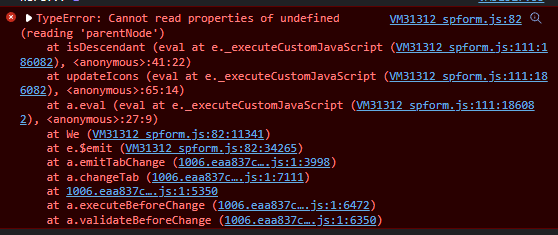
I replaced the fd.fields() to fd.data() but I do not think they are the same. When i check in de isDescendant(fd.container('Wizard1').widget.tabs[i].$el, fields[y].$el), I get an error:
Thanks for all your help @Nikita_Kurguzov !
I did it in a slighty different way to get all the fields since fd.data only seems to terun text and multiline fileds.
For refernce: In the above code i changed to the following:
const fields = fieldsInTab(i);

function fieldsInTab(tabIndex) {
        var titles = [];
        var fields = fd.container('Wizard1').widget.tabs[tabIndex].$children
        for (var i = 0; i < fields.length; i++) {
            if (!fields[i].$el.hidden) {
                titles.push({
                    dom: fields[i].$el,
                    value: fields[i].$children[0].value
                })
            }
        }
        return titles;
    }