Hi. There are a couple external emails that are set to send emails to our email address which creates new helpdesk tickets. We want to stop these emails from creating new tickets.
I've set the contacts in question as inactive but they still seem to create new tickets. Can this be handled with a trigger or by another way?
You can use triggers to close the tickets from the specified contacts automatically.
As an alternative, you can configure a Power Automate flow to forward the messages to the HelpDesk site if the addresser does not match the e-mail you want to exclude.
There is another possible variant that requires testing. If you connect an Outlook mailbox to the HelpDesk site, it creates tickets from the messages arrived to the 'Inbox' folder. Perhaps, you can create a rule in the Outlook settings to move some messages to another folder and thus, exclude them from the ticket creation.
If you need help with any of the options, please let me know.
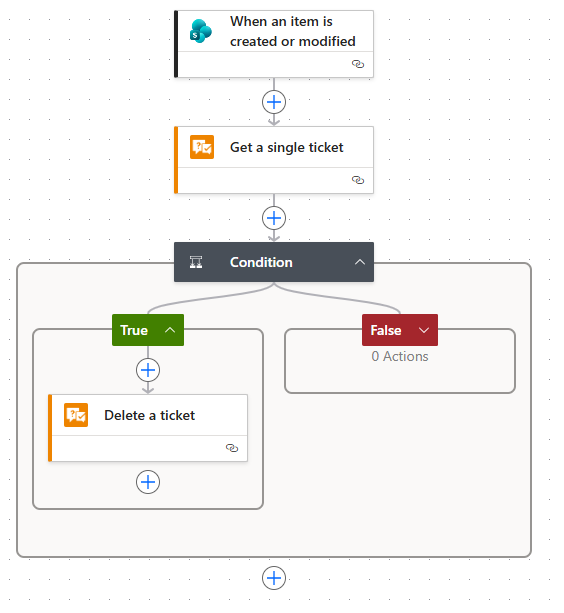
Hello, if by any chance it helps, we have a Power Automate flow setup that reads the ticket info, and deletes it if it's from a certain sender. We use the Plumsail connector "Get a single ticket" and read the Ticket requester. If it returns true (or false depending on the condition you set) we use the plumsail Delete a ticket action. But I do believe the second approach that Evgeniy suggest with the outlook rule, might be more elegant, and we will actually test it out, since our approach does create a ticket, and it deletes it with a few second delay, but the ticket ID counter does still increase.
Thank you for these suggestions. I am looking into the trigger solution - though it does increment the ticket counter, it seems like the least likely to break. I believe the issue with the Outlook rule is that the Outlook client would need to be open for that to execute. Unless I'm mistaken, I don't think it could run as a serverside rule.
For the trigger option, I'm checking to see if [Ticket.Requester.Email] matches the email in question and then setting the status to closed. Is that sufficient?
Yes, it is sufficient. But it will require to add every e-mail tickets from which you want to close automatically. If you want to make the solution more scalable, I would advise to create a custom yes-no column in the 'Contacts' list, for example 'BlackListed', and mark the required contacts there. The trigger should only check whether [Ticket.Requester.BlackListed] is equal to 'true' and if so, close the ticket.